
• You can now help support WorldwideDX when you shop on Amazon at no additional cost to you! Simply follow this Shop on Amazon link first and a portion of any purchase is sent to WorldwideDX to help with site costs.
  • A Winner has been selected for the 2025 Radioddity Cyber Monday giveaway! Click Here to see who won!

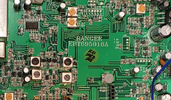
RCI 2950DX-6 Alignment Specs for Board EPT695016A

Lkaskel

Well-Known Member
I Support WorldwideDX.com!
Aug 4, 2017
521
433
73
61
Hey Everyone,
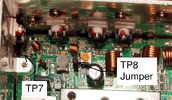
I need to align this DX-6 and while most of it is similar to other RCI radios the transmit section is a little different. There is no shorting board and there is only a jumper to align the finals. There is no jumper for the drivers but there is a spot on the board near the drivers labeled TP7.
1739238715141.png

Would anyone have any alignment info for this? What would the bias settings be for the driver and final? With the jumper (TP8) I can adjust the finals (two) for current but without a jumper for the drivers (two) I am unsure.
1739239002211.png

Thanks!!!
 
  • Like
Reactions: Eldorado828

So nobody replied here yet.. ?

I can't find the schematic to that 016A board.
but are those IRF520's? four of them. ?

I would just monitor the input current to the radio.
Key up in the usual SSB mode with no mic audio.
turn each bias pot so the current goes down to
the lowest setting at each.
then go back and turn each pot up for about
35 to 50 mA for each device.
 
in my notes I saved, according to Klein Comms:

"The mysterious & secretive "Ranger" branded part-number RT-1 of their RF-power output / final MOSFET, is actually just an IRFZ-24N underneath the OEM "scrubbed" / ground-off labeling.!"

most of them little MOSFETS are similar. just turn up the gate voltage,
at around 3.5 to 3.8 volts and watch the current draw.
 
I still would love to have the schematic for this board as it is similar to some boards but different than others. Also, the alignment guide would be amazing to take some of the mystery out!!!

Here is what I did for the driver/final bias alignment. I removed the jumper TP and put my mA meter between the pins. I powered the radio in USB mode. I then turned down the driver adjustment VR12 to 0 mA. I then adjusted VR12 to 100mA (50 mA for each the pre driver and driver). I then connected the mA meter in between the positive power leg leaving TP8 out still. I turned the radio on and adjusted the final bias VR11 to its minimum reading. That would be what ever current is needed to power the radio at that point. My radio was 274mA. I adjusted VR11 to 375mA (increasing the radio current draw 100mA) accounting for 50mA for each final.

This was from Nomad https://www.worldwidedx.com/threads/rci-rt-1-mosfets-wtf.264250/
 
I powered the radio in USB mode. I then turned down the driver adjustment VR12 to 0 mA. I then adjusted VR12 to 100mA (50 mA for each the pre driver and driver).

This was from Nomad https://www.worldwidedx.com/threads/rci-rt-1-mosfets-wtf.264250/
I am currently fixing a Ranger RCI-69VHP (same motherboard EPT690012D as in RCI-69 base).

I understand that you are you doing the mA readings in USB mode but is it in RX mode or do you key up in TX and then make the bias adjustments while in TX?
 
I am currently fixing a Ranger RCI-69VHP (same motherboard EPT690012D as in RCI-69 base).

I understand that you are you doing the mA readings in USB mode but is it in RX mode or do you key up in TX and then make the bias adjustments while in TX?
The bias adjustments must be made in TX mode with no modulation.
 

dxChat
Help Users
  • No one is chatting at the moment.