• You can now help support WorldwideDX when you shop on Amazon at no additional cost to you! Simply follow this Shop on Amazon link first and a portion of any purchase is sent to WorldwideDX to help with site costs.

Anytone AT 5000

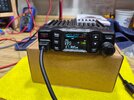
Just getting familiar with this radio and I'm trying to figure out what all of the items in the display are telling me. Here's the LCD with everything shown.

View attachment 76191

The manual has some things explained like the yellow S which indicates that the current channel is in the scan list. I see the R come on whenever SSB is selected, but what does this mean? I have not seen the green + come on, or the red A, or the T and none of those are described in the manual. Anyone here that can help explain the meaning of these? Sorry if these are newb questions.
R (in SSB) is for RX Clarifier. (You can set this for OFF, R, T or R+T in the menu).

The "S + A" area of the screen is for showing Scan, Offset, and Scan ADD.

The CPS (Programming software) is not ready for release yet, but it will be soon. It will appear on the AnyTone website as soon as it is available for download.

73
 
R (in SSB) is for RX Clarifier. (You can set this for OFF, R, T or R+T in the menu).

The "S + A" area of the screen is for showing Scan, Offset, and Scan ADD.

The CPS (Programming software) is not ready for release yet, but it will be soon. It will appear on the AnyTone website as soon as it is available for download.

73
Thanks, all clear now!

73
 
I interesting video from @BlueBeam on this one.
( Aka Panic attack)

73
Jeff


Thanks for the video links. Really glad to see that there is a VFO mode! Not mentioned in the manual. Press FUNC then press and hold BAND. VFO displayed, and the steps can be changed by pressing the push key then turning it to select the step. Also downloaded and installed the programing software. There's a pull down for the CB/HF/HAM selection, but only CB is shown in the drop down list. Don't have the radio connected, maybe when I do since I moved the jumper to make HAM selectable it will give me all three options.
 

dxChat
Help Users
  • No one is chatting at the moment.
  • @ heartbreaker3473:
    Hello gentlemen and Ladies. I have the dreaded RCI-2990 receive issue where my radio gets distorted when people get close to my location. I found the C90 Capacitor, but I can not for the life of me find the C89 capacitor. Can or does anyone have a picture of the exact location of C89 ? Thank you in advance, Wes
  • @ AudioShockwav:
    Wes, it's better if you start a thread on the main forum, more people are going to see your question.
  • @ heartbreaker3473:
    Okay, sorry, will put in a forum
  • @ heartbreaker3473:
    I put it in the general disscution help area and started a new thread. Thank you for letting me know.