• You can now help support WorldwideDX when you shop on Amazon at no additional cost to you! Simply follow this Shop on Amazon link first and a portion of any purchase is sent to WorldwideDX to help with site costs.
  • A Winner has been selected for the 2025 Radioddity Cyber Monday giveaway! Click Here to see who won!

Cobra 142GTL No Transmit or Receive

I changed the resistor to a 22k and I'm able to get the CH 19 LSB TX frequency to 34.982500 with plenty of adjustment on either side. (feel like DA putting a 22 ohm there!)

Now.. When checking the divider input on CH1 I am getting 1.430153 to 1.430360 The Hz are drifting.. As I go up channels it doesn't drift as bad. CH 10 is drifting from 1.540080 to 1.540105. CH 19 is 1.650084 to 1.650087 CH 30 is 1.770090 no drift Ch 40 is 1.870095 no drift. dunno if there is a way to adjust...

When trying to get CH 19 USB to 7.802500 it is drifting pretty bad the best I can get it is 7.802488 to 7.802580

Trying to align CH 19 LSB to 7.797500 is drifting from 7.797475 to 7.97590

When removing TP7 & TP8 to Align CH 19 AM TX to 7.800000 it drifts from 7.800435 to 7.808548. Jumps around so much can't even get close.

Just when I think I'm making progress....
 
You are experiencing the same problem on both the PLL loop and the carrier circuit (separate thigns), so it might be a probe loading issue where your counter is not getting enough signal. If you have a signal generator, you can test that by generating a SSB tone in the receiver, If that is steady, we can blame the probe and insufficient signal strength for the counter to get a good lock.

If the frequencies are changing (the RX tone warbles) without being probed, then we can move on, but one step at a time.

Basically, fire up a sig gen with the leads just hanging off your bench and change the frequency until a tone comes out of your radio in SSB. If it is steady, thats a good sign. Start with the sig gen at 27.184 and listen on ch19 LSB.
 
Last edited:
  • Like
Reactions: Tech5 and Cable Guy
you don't still have the sensitivity on the FC turned down from earlier, do you?

Edit:
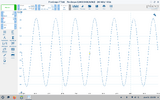
In the meantime, I am going to re-peak L14 in my washington (since I had it apart) so you know what to expect there on the scope (using 10x). If we are close in amplitude, we will know its not a false peak due to the wrong capacitance (and max transformer coupling).

TP1:
Screenshot from 2025-06-14 22-05-27.png
 
Last edited:
  • Like
Reactions: Tech5 and Cable Guy
Hope you are having a great Father's Day!

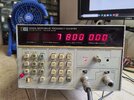
I swapped counters and was able to get the Carrier Oscillator aligned on USB, LSB and AM with no drift.
20250615_122331.jpg

Seems the Agilent counter needs a little more signal to lock on. Glad I had a backup. Something learned. At least I'll know this going forward.

The divider inputs are still off but not drifting. Is there any way to adjust? Would this have anything to do with the 10.240 MHz being off a Couple of kHz? I am reading 10.238630 at Pin 8 of the MB8719

The waveform on my scope looks very similar to yours after peaking L14.

I guess next step is to align the receiver?
 
  • Like
Reactions: Tech5 and Cable Guy
I agree with Cable Guy. Crystals drift with age.

I would start by giving that crystal a little tap with something hard. Nothing to serious, just a good jolt straight down (not side to side). Sometimes that can partially reset the drift. The goal is to vibrate it a little, not damage it, so be careful.

Odds are, that won't work (its only worked for me once), but its worth a try since its not behaving anyhow. Thankfully, that is the most common crystal ever made and you shouldn't have any trouble finding one. If you can't, you will be swapping capacitors. A trimmer where C64 is would make it adjustable.
 
  • Like
Reactions: Cable Guy
Since 10.239853MHz / 2^10 = 9.9998564kHz at the phase detector, I'd say that is plenty good.

Edited, see post 59
 
Last edited:
It's been a really long day and my brain went into stupid mode when I tried calculating the error in post #55/56. It won't be anywhere near that bad lol.

Since the 11MHz oscillator is going to put ch19 right on the nuts compensating for the reference error on that channel, you will only have an error of about 3Hz at each end of the dial if you align on ch19.

Sanity check... On ch19, to get the VCO at 34.985, the 11MHz oscillator will have to be at 11.111675MHz. This is because 10.239853MHz / 2^10 = 9999.8564Hz at the phase detector, which will then demand the same from the input divider. Since ch19 has an N of 165, the input must be at 1.6499763MHz to produce that. If you have 34.985MHz and subtract 1.6499763, you get 33.335024MHz at the tripler, which divided by 3 is 11.111675.

Ch19 is the middle of the dial, so that 6Hz from one end to the other, this time centered on ch19 with 19 being right on, you will only have an error of 3Hz at either end of the dial.

I put it in my excel calculator to verify this time before posting lol.

If we continue our mathematical sanity check for ch1 and ch40, we multiply what the phase detector wants (9999.8564Hz) by the N of those channels (143 for ch1 and 187 for ch40) which requires divider inputs of 1.4299795MHz and 1.8699731MHz respectively. Since we already know the tripler is at 33.335024MHz, the VCO will be at 34.765003MHz and 34.204997MHz respectively. Subtract 7.8MHz from the carrier oscillator and you get 26.965003 and 27.404997MHz respectively. So yea, that 10.239853MHz crystal is totally cool. Ok, I'll give it a rest, just wanted the math there for the next person that chooses a slightly off crystal. Now for one last drink :)
 
Last edited:
You guys are awesome!

I have realigned the synthesizer and carrier oscillator and everything is spot on.

I still don't seem to have any receive. I key up a working radio and don't get anything on the 142. Just the static hiss.

There is a little something going on when I key up the 142 on a dummy load. The working radio's meter moves a little maybe an s unit....

How to proceed from here?
 

dxChat
Help Users
  • No one is chatting at the moment.