

General Behavior and Everyday Use
The Radioddy GS‑10B Pro is one of those radios that tries to cover a lot of territory. It’s a VHF/UHF handheld, but it also dips into HF, AM broadcast, shortwave, airband, and general wideband receive. It’s Radioddity’s attempt at making a “do‑everything” handheld for people who like to poke around the spectrum. Whether that’s good or bad depends on how you use it, because this radio rewards the operator who takes a little time to understand what it can and can’t do.On VHF/UHF, the GS‑10B Pro behaves exactly like a budget wideband handheld should. It hears repeaters and simplex without drama. It’s not the most robust front end, but it’s not fragile either. Transmit audio is clean enough for normal use, FM audio is clear, scan speed is average, and dual‑watch works even though it’s not true dual‑receive. Nothing here is surprising, and that’s actually a positive — you don’t have to fight it.
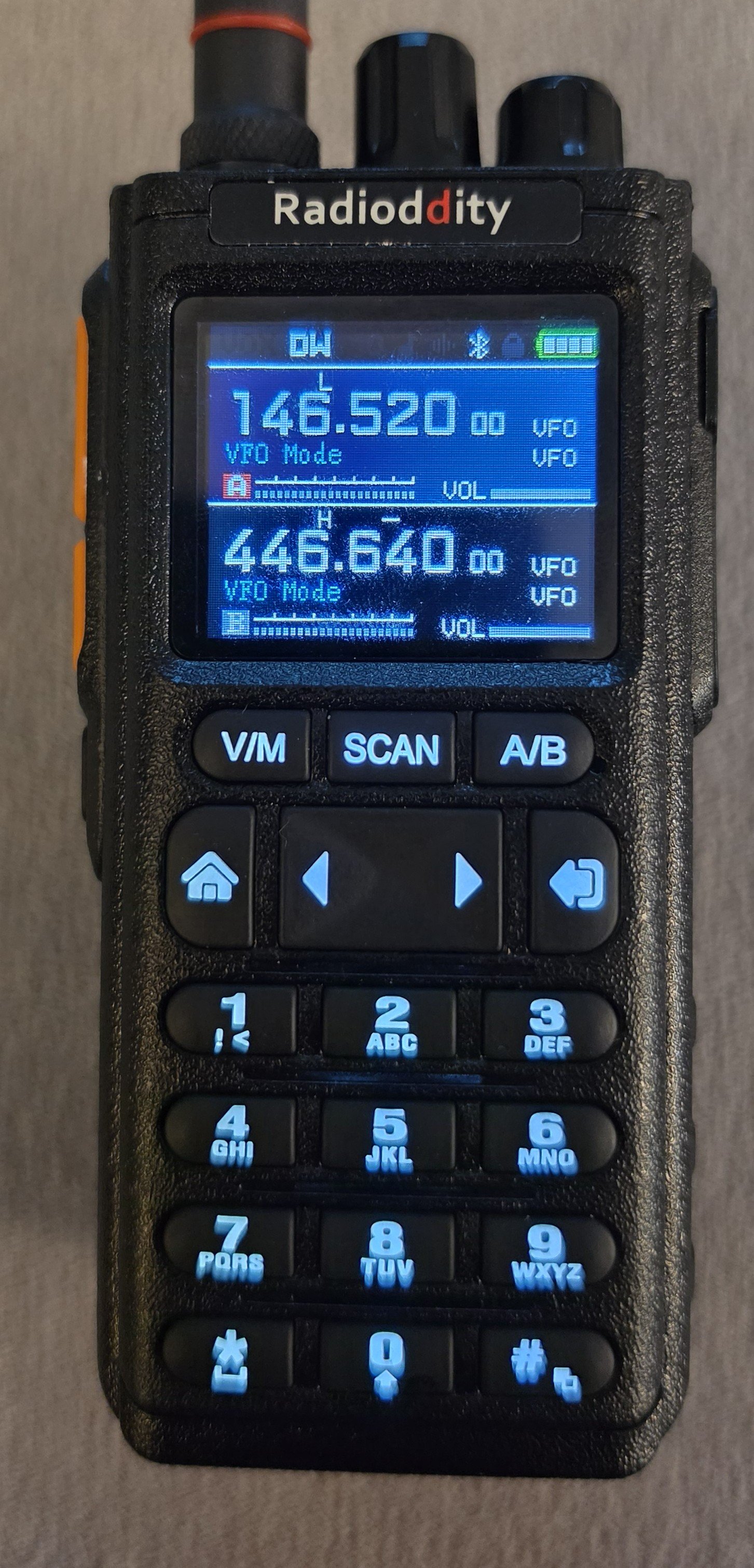
FM broadcast works exactly the way you’d expect. It’s clear, stable, and good enough for casual listening. Scan speed is slow, but once you land on a station, it sounds fine. Airband AM is very usable. It’s not going to replace a dedicated aviation receiver, but it’s good enough for casual monitoring. Sensitivity is decent, and the audio is clear enough to understand transmissions without effort. Spectrum scan is basic, but useful. It’s not a real waterfall or panadapter — more of a “signal finder.” It’s slow, but it does help you locate activity across a band.
Durability is about what you’d expect. The GS‑10B Pro has no IP rating. It’s not waterproof or water‑resistant. It’s fine for normal use, but it’s not a radio that you should abuse, either.
Bluetooth programming is a great idea — no cables, quick changes, easy updates. The app itself is where things get messy. It’s clearly built on a Chinese translation layer. Some menus are in English, some are half‑translated, and some are straight Chinese. It works, but it is unfinished and will probably frustrate a lot of users. Bluetooth is only for programming; it doesn’t support Bluetooth audio devices.
One really nice touch is that Radioddity took the time to write a detailed user manual for this radio, but they only give it to buyers and it’s not posted publicly. The manual is more thorough than their usual documentation and goes fairly deep on HF operation. There are a few topics that could use some additional details, but it does help you understand how the radio works and I didn't have any problem figuring out the loose ends. Radioddity explicitly asked me not to post the detailed manual and I will respect their wishes.
HF, Shortwave, and the Donut Antennas
HF is the feature that gets people’s attention, and it’s also the feature that causes the most confusion. The radio does receive HF, and it does it reasonably well, but only if you give it an antenna that actually belongs on HF. The radio came with two donut micro mag loop antennas: one for AM broadcast and lower, and one for the Ham and SW bands.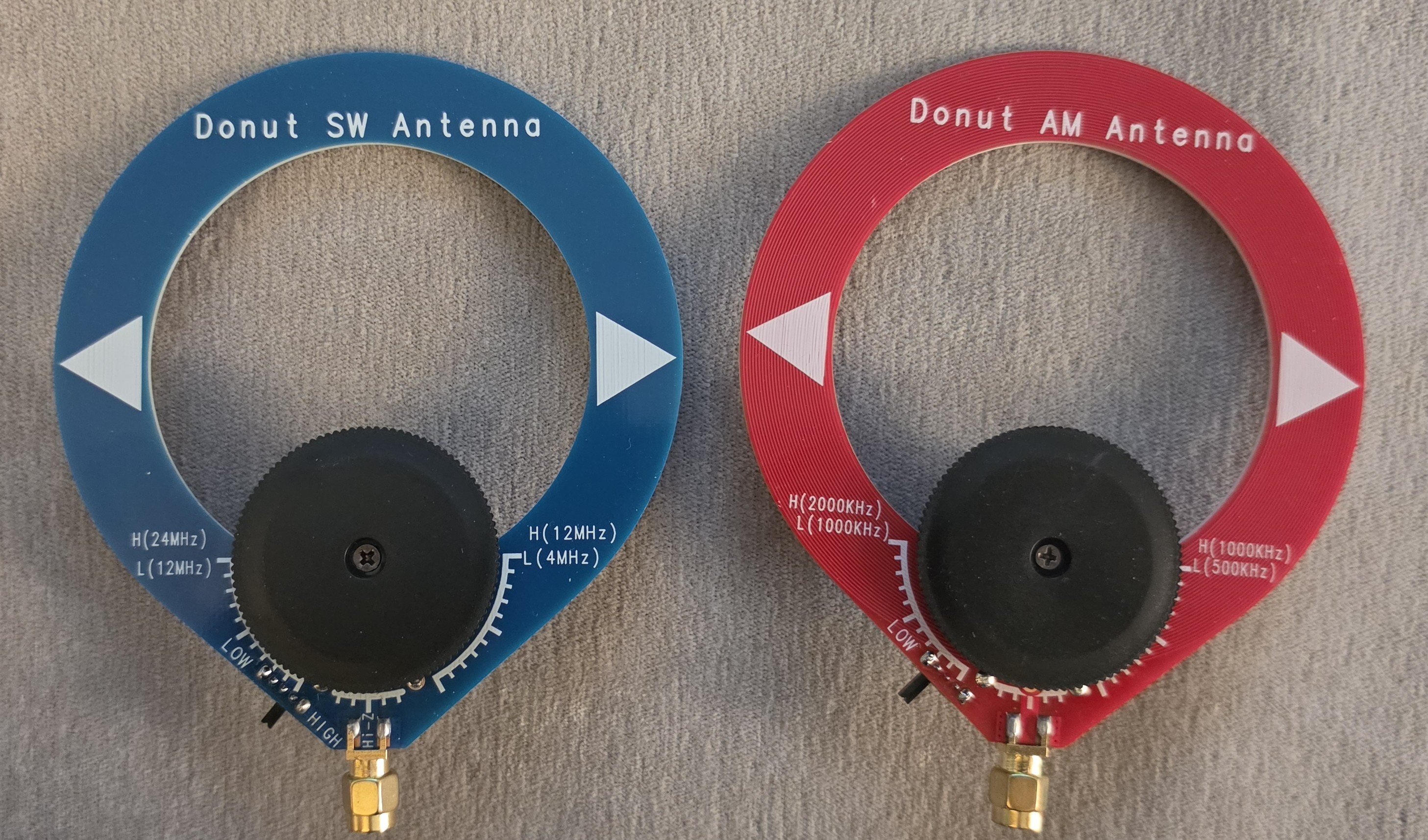
Each donut antenna has two controls: an H/L switch for selecting the rough frequency range, and a capacitance tuning dial for peaking the antenna. You set the H/L switch according to the printed band markings, then slowly adjust the dial while listening for maximum background noise, which tells you you’re close to resonance. After that, you can rotate the antenna to find the strongest orientation for the station you’re trying to hear.
With the included AM donut antenna, you can listen to broadcast AM stations reasonably well. But keep in mind that AM stations typically broadcast with 10K watts or more, relying on groundwave propagation. Compared to the Kenwood Th-D75A with the interla bar antenna, I didn't find the donut antenna any better - and i tried both on the Kenwood. However, when you try to use HF with the included shortwave donut antenna, HF is basically silent. You won’t hear much of anything. But that’s not the radio’s fault — that antenna is simply too small to do anything meaningful on HF. You’re much better off abandoning the donut entirely and using a simple length of wire. Once I attached a 20‑foot piece of wire, the radio immediately came alive and HF became usable. A very easy way to do this is with a short pigtail like the one I used from Amazon like this: https://amzn.to/4px24zY I just attached a wire to the positive side and let the rest hang. Even a random wire performs dramatically better than the donut.
HF Usability Tips
The HF controls are basic but workable. You get mode selection, bandwidth, a "BFO" that is really a RIT, and LNA gain. The BFO/RIT works well enough for fine‑tuning SSB and CW. The bandwidth setting is the one quirk you’ll notice — every time you switch into an SSB mode, the radio resets the bandwidth to 0.5 kHz instead of remembering your last setting or defaulting to something useful like 2.2 or 3.0 kHz. So you’ll be widening the filter manually every single time you enter HF SSB. It’s not a deal‑breaker, but it’s definitely something you notice. There are a couple of small usability details worth knowing. If you’re listening to the AM broadcast band and want to switch to HF using SSB or CW, you must change the modulation mode first. Once you select USB, LSB, or CW in the menu, the radio performs its HF initialization sequence and then jumps to the last HF frequency you used. It won’t switch directly from AM broadcast into HF SSB without that mode change.
Also, when you’re in HF mode, the radio still listens to whatever VHF/UHF band you were using last. For example, if Band B was sitting on a busy repeater, switching to HF doesn’t silence it — the radio will briefly jump back to Band B whenever the repeater transmits, then return to HF when the signal drops. If you don’t like this behavior, set the inactive band to a quiet simplex frequency or something seldom used before switching to HF.
Comparison With the Kenwood TH‑D75A
When I compared the GS‑10B Pro to the Kenwood TH‑D75A on 40 meters, I used both the shortwave donut and a simple wire antenna on each radio. With the donut, both radios were basically struggling — The TH-D75A was slightly more sensitive, but I could barely hear signals on the either radio. Once I switched to wire and set the GS‑10B up properly, the Radioddity actually pulled in signals a bit stronger than the Kenwood. The Kenwood still has the advantage of a proper attenuator, which I really wish the GS‑10B had because it helps tame a high noise floor when the band gets messy. The Kenwood’s user interface is also much more refined — it feels polished in a way Radioddity isn’t trying to compete with at this price point. But the GS‑10B has its own nice touches. The “BFO” behaves like a RIT and the tuning step is much finer than the Kenwood, which actually makes it easier to zero in on SSB signals. HF on the GS‑10B Pro isn’t going to blow anyone away, but it’s perfectly usable once you give it a real antenna and set it up correctly. With a simple wire, the radio pulls in SSB and CW well enough for casual listening, and it performs well enough for a wideband handheld trying to cover HF.Where Reviewers Go Wrong
Before I published my own review, I wanted to see what others were saying. As of this publication, there is a bit of misinformation out that that I decided to address, which is not normally something I do. One of the more misleading reviews out there comes from the HIGGINSREPORT youtube channel. He tries to evaluate HF on the GS‑10B Pro using only the included shortwave donut antenna and barely hears anything, which isn’t surprising — that antenna is simply too small to be useful on HF. He also claims the radio has “no instructions,” even though Radioddity provides a fairly detailed manual for customers to download. It’s not perfect and it leaves out a few HF tips that would be helpful, but it’s absolutely enough to understand the menus, modes, and basic operation.The bigger problem is how he actually used the radio. At one point he tries listening on 20 meters in AM mode while tuned to a frequency that is an obvious SSB frequency, so of course it sounds wrong. He never changes the mode, never adjusts LNA gain, never opens the bandwidth, and doesn’t use the BFO/RIT to tune SSB properly. Without those steps, the radio will always look like it’s struggling. His AM broadcast test was fine, and his VHF/UHF impressions were normal, but his HF conclusion came entirely from incorrect operation and the weakest possible antenna. If you watch reviews like this, the key is to evaluate how the reviewer is actually trying to use the radio — because if they don’t understand the controls or the basics of HF operation, their conclusions won’t tell you anything about how a radio like the GS‑10B Pro really performs.
Noise Reduction (NR)
The radio does have a Noise Reduction feature, but it only works in FM mode. I couldn’t find any way to activate NR on HF, AM, or SSB, and nothing in the menus or the app suggests it’s available outside FM. It helps smooth out hiss on local FM signals, but it doesn’t do anything for HF noise or weak‑signal work.One thing to know: apparently when NR is turned on, it affects both RX and TX. The affect on TX is really bad - others listening to my transmissions said that the audio quality was really bad with it turned on - to the point where I was barely legible.
Memory Channels and How They Work
One thing the GS‑10B Pro does better than most wideband handhelds is how it handles memory channels across every part of the spectrum. You’re not limited to storing just VHF/UHF repeaters — you can save frequencies from LW, MW, SW, HF, Airband, and anything else the radio can tune. It allows you to build out proper shortwave or HF listening presets instead of manually dialing around every time. This makes the radio much easier to use on HF because you can store known SSB frequencies, AM broadcast stations, or shortwave broadcasters and jump straight to them without reconfiguring the radio. The memory system isn’t fancy, but it’s flexible, and it’s one of the more useful features for anyone who plans to use the GS‑10B Pro outside the usual VHF/UHF environment.Final Thoughts
For the price, the GS‑10B Pro is a radio that tries to do a lot and mostly succeeds. It’s not a polished radio, but it’s not a bad one either. It’s a wideband handheld that becomes genuinely interesting once you attach a real HF antenna. The AM donut works. The SW donut does not. The display can be a little difficult to see outdoors in the direct sun. The app has Chinese translation issues. But the radio does receive HF SSB/CW reasonably well with wire, and that alone makes it worth a look for operators who enjoy experimenting, especially at the price point, which is about $70.If you want a compact radio that lets you explore HF, AM, SW, Airband, and VHF/UHF in one box, the GS‑10B Pro is a fun little radio with quirks you can work around. Figure out an easy way to put some wire in the air and have some fun, keeping your expectations in check. For what it's worth, the wire antenna I used in the video was just strung over a patio table umbrella...don't over complicate it.
As a side note, if I was going on a cruise and wanted to listen to shortwave radio while at sea (which I've done), I wouldn't hesitate to take this radio and drop a wire over the deck at night. How fun would that be?

Radioddity GS-10B 8W Ham Radio | Tri-Band
Shop Radioddity GS-10B 8W Ham Radio, a two way radio with tri-band, NOAA alerts, CHIRP support and CPS programming. Built for ham operators, emergency prep.
 www.radioddity.com
Edited: Added comment about NR affect on transmitted audio quality.
Last edited:


