

The Retevis MateTalk L2 combines push-to-talk over cellular, or PoC, with a conventional VHF/UHF analog radio in one handheld. Four operating modes provide analog communication, network-based PTT, access to both systems, and a bridge between PoC and analog. Its feature list includes Wi-Fi, dual SIM support, Bluetooth, GPS, Zello compatibility, call recording, a 3000 mAh battery, and USB-C charging. Retevis also specifies an IP67 enclosure, an appealing feature for a handheld that may see outdoor use.
Retevis supplied two radios with AT&T service for this review. Over a few months, I have used them remotely from different cities around the United States, primarily with one serving as a remote base at home. That application has been the most interesting part of my testing, but the radios have also provided an easy PoC communication option for my family. Along the way, I encountered some limitations, worked with Retevis on a firmware issue, and found several features worth highlighting.
Hardware and Everyday Use
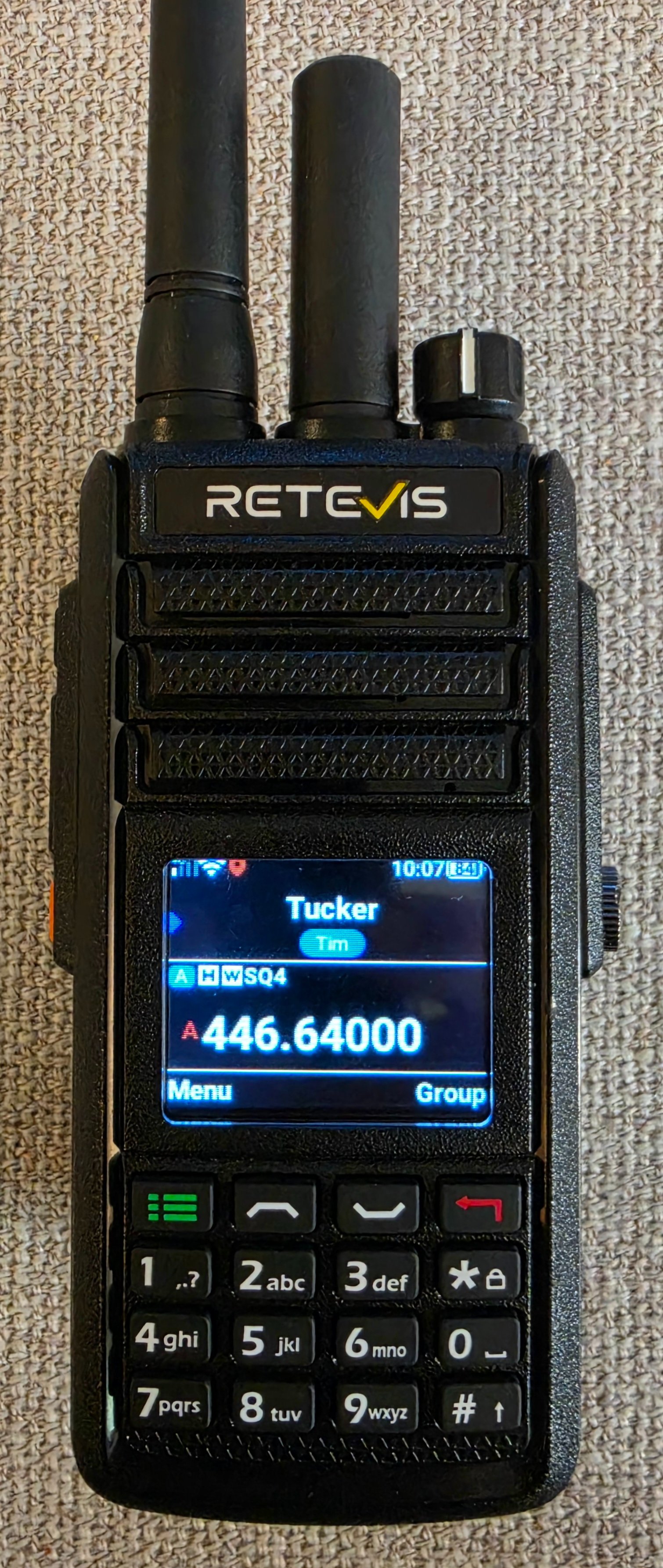
I like the L2’s hardware. It feels durable, and the physical buttons and numeric keypad give it the familiar controls of a handheld radio. The color screen is useful, although direct sunlight calls for its brightest setting.
The IP67 rating is particularly attractive to me because I like fishing and spending time around water. I have drenched the radio without trouble, although I have not submerged it or attempted to independently verify its full immersion rating. Having that protection provides reassurance when using it in places where getting wet is a realistic possibility.
Battery life has been excellent in my use. For remote-base operation, the radio can also remain plugged in, making it practical to leave a unit at home without depending on its battery for extended operation. I connect the analog side to my base antenna when using it for ham radio, taking advantage of the home station’s antenna coverage.
The L2 also has its own dedicated external antenna for the cellular network. So far, I have not experienced problems with cellular connectivity during my travels. One of the first things I did was connect a radio to my home Wi-Fi, which was easy. That provides a convenient network connection for the unit remaining at home.
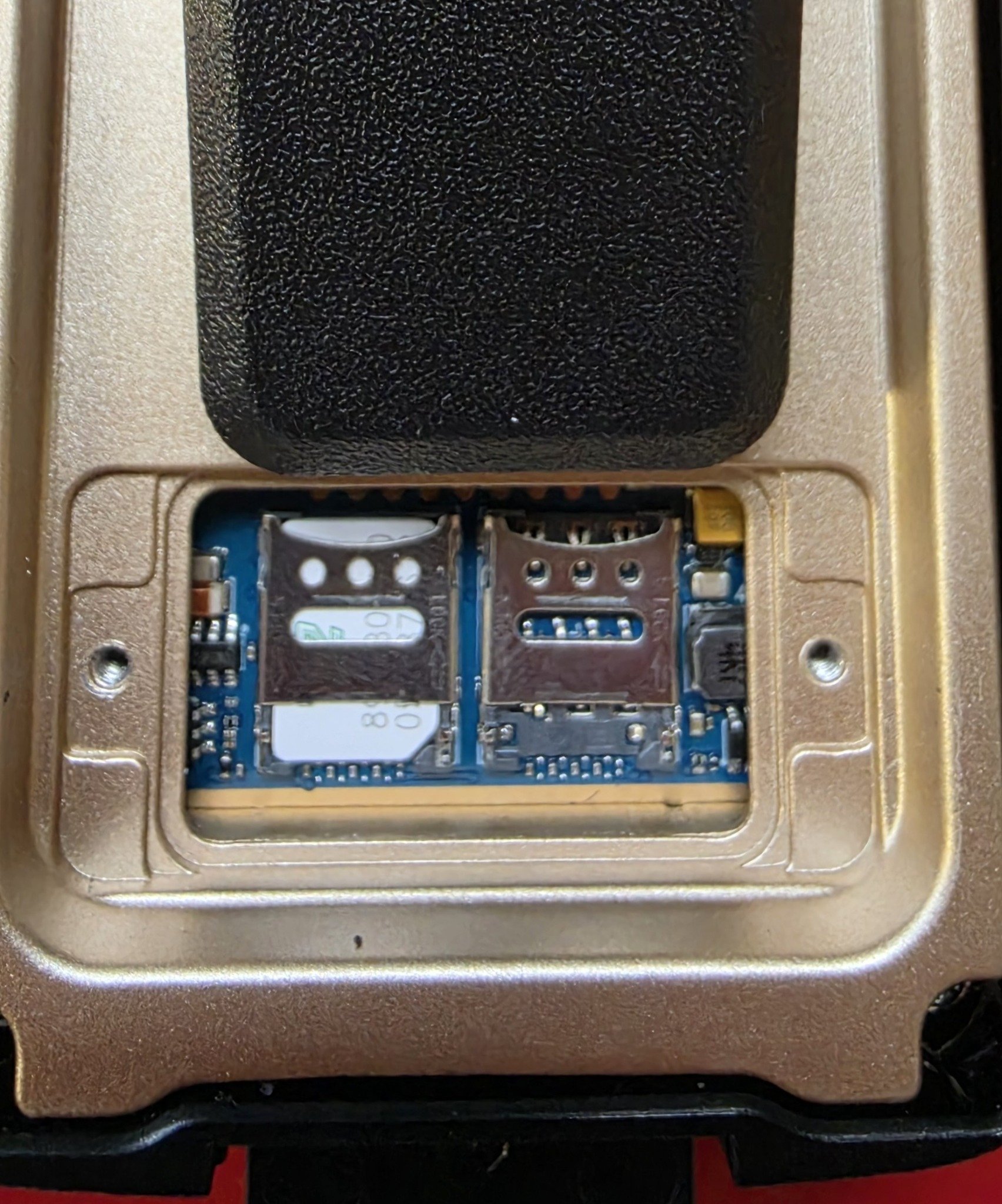
The card compartment sits behind the battery, with a SIM installed in the left-hand holder in the photo. Cellular data supplies the network connection when Wi-Fi is unavailable, allowing the portable L2 to reach the PoC service while away from home.
Four Operating Modes
The L2 offers Ang Mode, POC Mode, MIX Mode, and RPT Mode. Analog and PoC modes operate their respective communication systems, while MIX makes both available through the operating interface. RPT supplies the bridge between a PoC group and the selected analog channel. That distinction is important: having access to both systems in MIX mode does not automatically forward conversations between them.
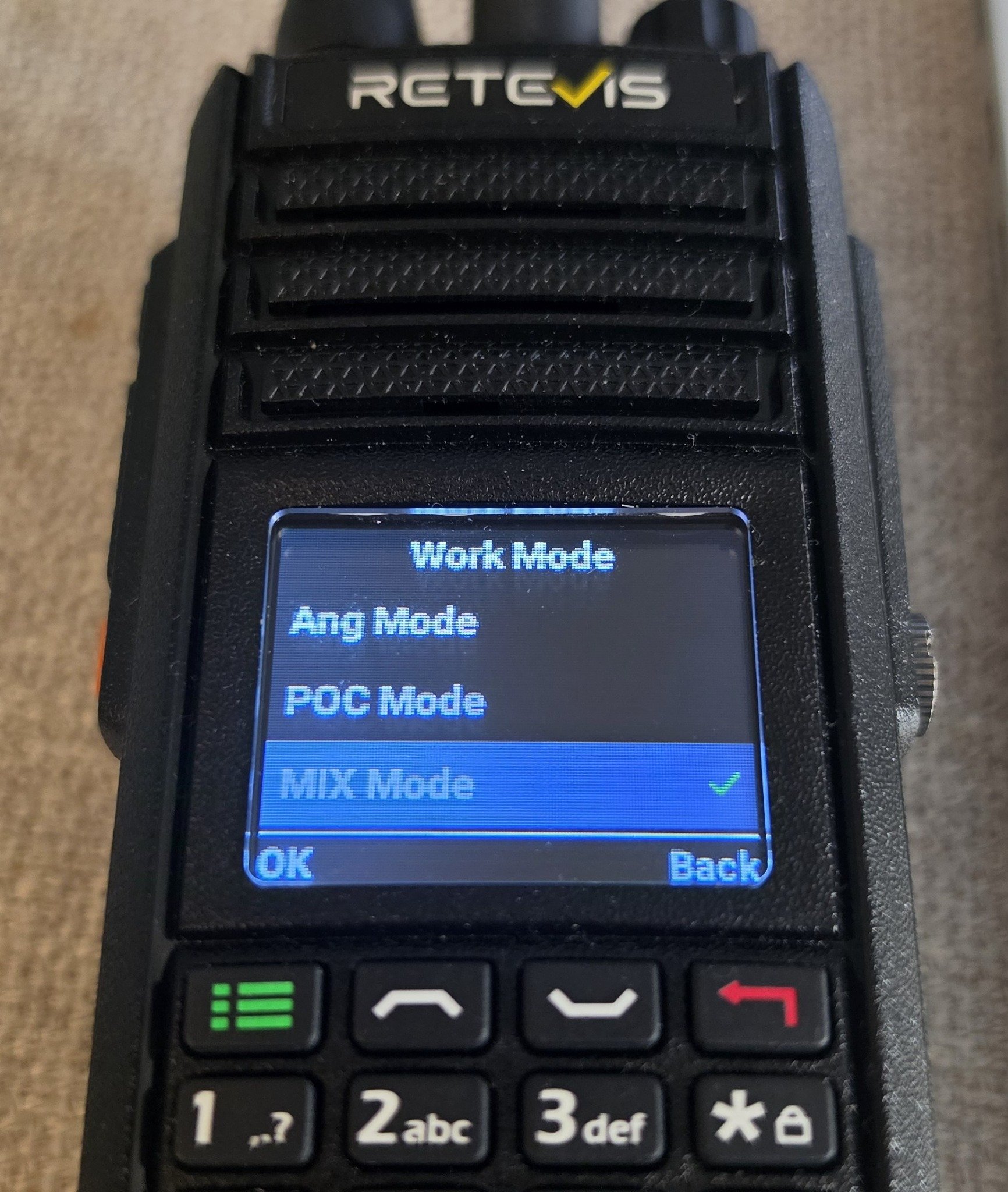
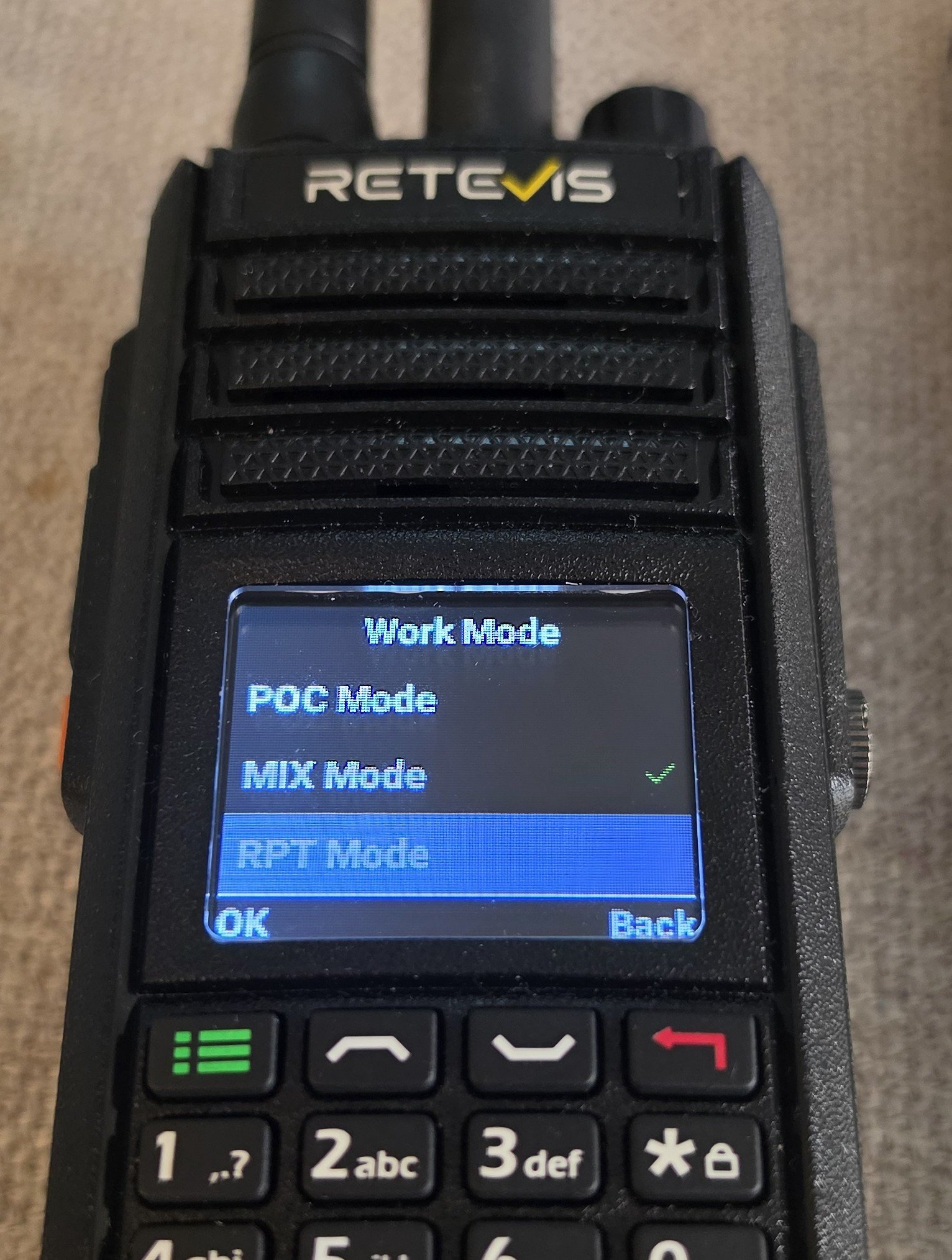
One minor interface quirk is that the blue highlight follows the cursor, while a green check identifies the active mode. In the next photo, RPT is highlighted but MIX remains selected. The check mark is the useful indicator when determining which mode is actually in use.
Remote Base Operation
For me, the L2’s strongest application is as a relatively low-cost remote base. One radio provides the analog RF connection at home, while another accesses it through PoC. My home L2 is programmed for the local amateur repeater and connected to my base antenna. Audio from the portable travels over PoC to the home unit, which transmits on the repeater’s input frequency. Received repeater audio returns over PoC to the portable.
This has allowed me to participate in local repeater conversations while operating from different cities around the country. The portable does not need to be within RF range of the repeater; it needs a working network connection to the PoC service.
A repeater is only one application. The remote base can operate on a simplex channel, providing access to analog stations within its coverage area. Nor is the feature limited to amateur radio: it can be used on any frequency supported by the L2 that the operator is authorized to use. The remote base’s location and antenna establish its analog coverage, while PoC provides the connection to the distant operator.
The setup I tested requires at least two L2s, making the Retevis MateTalk L2 two-pack a practical starting point. Additional radios could provide multiple remote-base access points at different locations. Linked or daisy-chained arrangements could also extend communication between analog stations beyond their direct RF range. My hands-on testing has used two L2s; these larger arrangements are a logical extension of the bridging capability rather than configurations I have personally tested.
Working Through a Reliability Issue
Early in my remote-base testing, the home radio repeatedly crashed when analog and PoC transmissions arrived at the same time. That was a significant problem for a radio I wanted to use remotely, where physically restarting it would not always be possible.
I reported the behavior to Retevis. They supplied updated firmware and subsequently asked me to experiment with the Account Level setting in the Retevis Smart POC Management Platform portal. The updated firmware, combined with setting Account Level to 3 on both radios, appeared to resolve the crashes. Both changes deserve credit here. Simply saying that Account Level 3 fixed the problem would leave out the firmware update that preceded it. For readers interested in the same remote-base application, these findings are useful details to discuss with Retevis if similar behavior occurs.
The portal’s Remote Kill function can also be useful if PoC cross-mode operation hangs up causing a "stuck key" situation on the remote, but it has an important limitation: it does not prevent the radio from actually keying on the analog side. It should not be treated as a complete remote shutdown of the RF transmitter. If the stuck POC mode was causing the radio to key the analog side, doing the Remote Kill function will cause the analog side to unkey.
Family PoC Use and the Zello Limitation
My family has used the L2s for PoC communication and found them very easy to operate. That adds value beyond my remote-base experiments. The same pair can serve as dedicated PTT radios for family communication without requiring everyone to understand the analog or bridging features.
Zello support sounds like another way to expand that usefulness, but it is separate from the Retevis PoC service. The L2 does not bridge Retevis PoC traffic to Zello. Retevis also states that RPT mode does not bridge analog traffic to Zello. That is an unfortunate limitation. Competing PoC radios offer mobile-app access to their communication systems, allowing a phone to participate without another dedicated radio. Zello on the L2 does not provide that connection to the Retevis PoC system. I would have liked the flexibility of including a family member through a mobile app while the rest of us used the radios.
Dual Monitor Falls Short
Another limitation is how the L2 handles incoming traffic. When it is busy receiving an analog signal, it will not receive an incoming PoC call, even with Dual Monitor enabled.
On a busy analog channel, a lengthy conversation can therefore mean missing PoC traffic. The setting’s name suggests that both systems remain available, but my testing showed that analog reception blocks an incoming PoC call. This is worth understanding if you expect to use one handheld for local analog activity while remaining reachable over PoC.
Audio and Call Recording
With the analog Compander enabled, other stations reported that my transmitted audio sounded bad. I turned it off, and subsequent audio reports were good. Based on those reports, I recommend leaving the compander disabled for analog operation.
The recording feature is a useful extra. It records both PoC and analog conversations, including transmitted and received audio. Each transmission or reception becomes its own WAV file rather than being combined into one continuous recording.
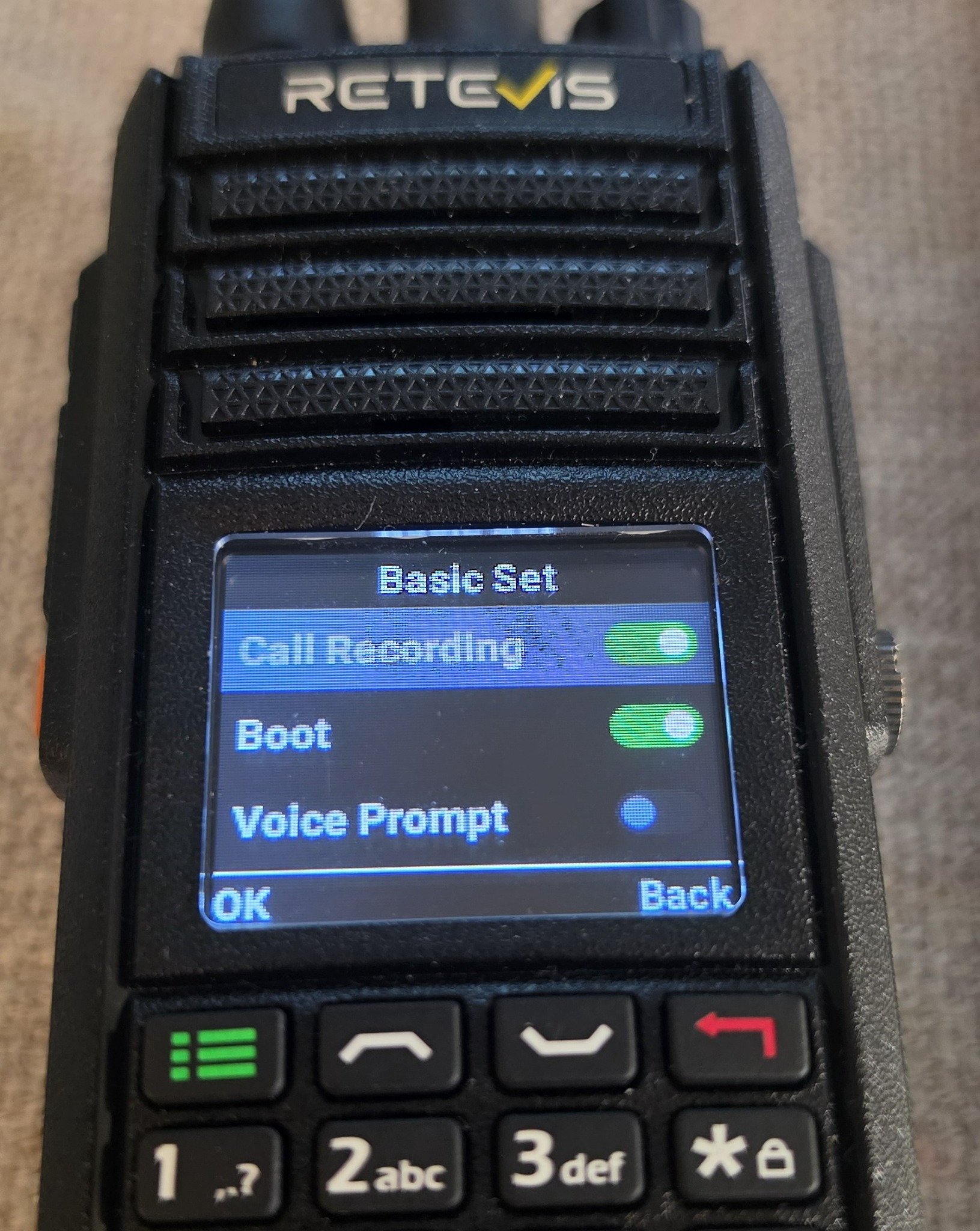
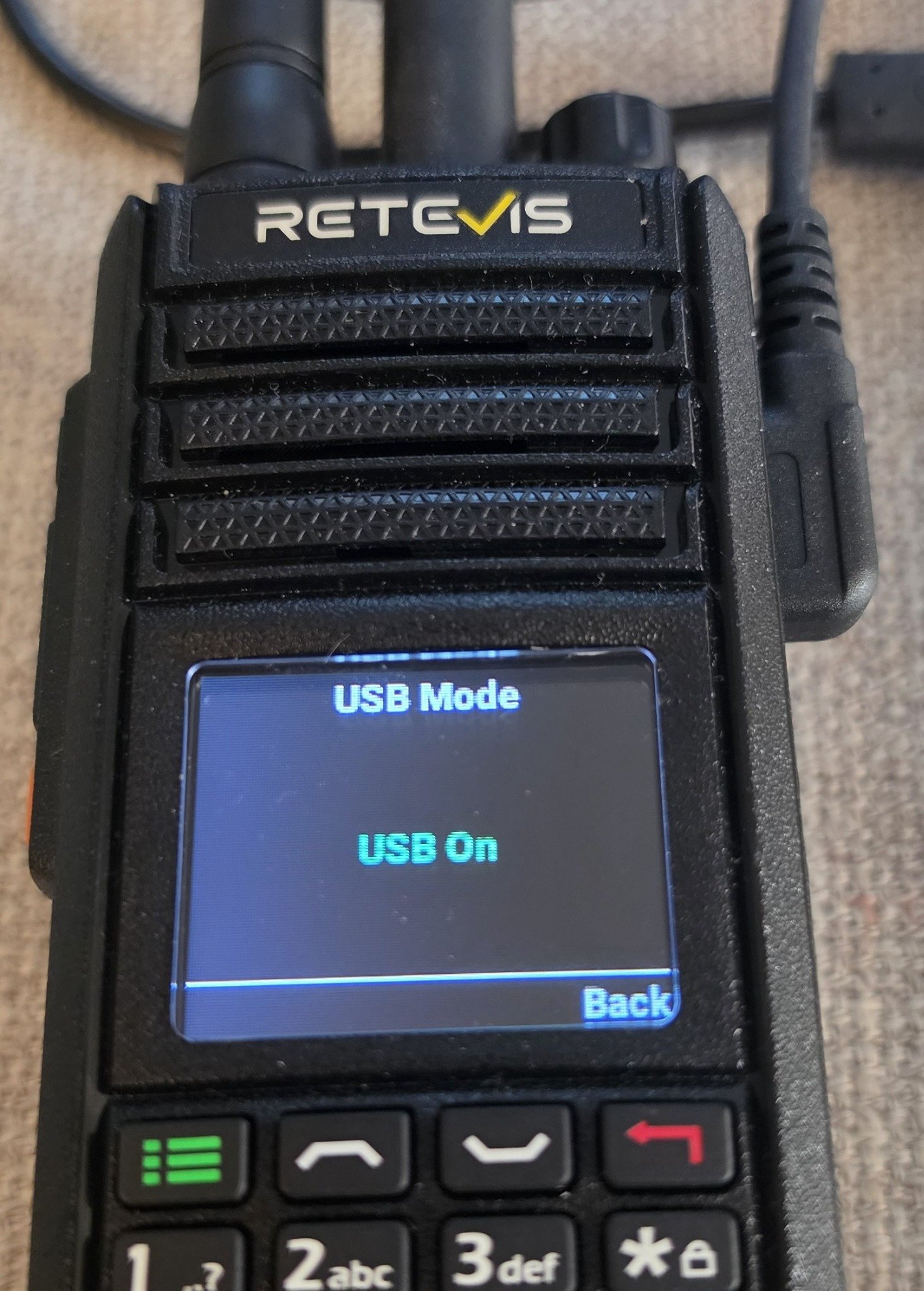
The option is labeled Call Recording in the Basic Set menu. Recordings reside in \SD card\TYTPTT\wav, which is accessible from a computer when the radio is connected in USB mode. Even though you can find the files using the Android desktop app, they cannot be played back on the radio.
For programming the radio or for file management (like deleting the recordings), there is a quick key to turn on USB mode: Simply hold the # key after you plug in the USB cable.
Ordinary WAV files are a welcome choice because they can be copied to a computer for playback or retained as audio samples. Keeping each transmission and reception separate also makes it convenient to retrieve a particular exchange. Recording both communication systems is especially useful in a radio whose main attraction is connecting them.
Basic Programming and Limited Button Choices
Programming is rudimentary, although adding a VFO frequency to a memory channel from the radio is easy enough. The desktop software is similarly basic. One frustrating omission is the inability to give channels descriptive names: neither the radio nor the software lets me replace labels such as “CH-17” with a repeater name or another useful identifier.
The programmable side buttons offer some customization, but their choices are limited and divided between analog and PoC functions. The upper analog button can operate the emergency alarm, clear subaudio settings, toggle VOX, start scanning, activate monitor, select high or low power, or turn on the broadcast FM radio. The button’s power-selection function is restricted to frequency mode. I chose the FM radio function for mine.
The lower orange button serves the Retevis PoC side. Its options include Call, access to the PoC group-member page, a public-network alarm, and a local alarm. Call uses a configured PoC emergency contact; the emergency-contact and group-member references belong to the Retevis PoC service, not Zello. These choices provide a few shortcuts, but I would welcome a broader selection of assignable functions.
Bluetooth is another feature I left unexplored. There is a Bluetooth setting, but the limited options and descriptions did not make its intended uses particularly clear. Its presence belongs on the feature list, but I cannot offer a firsthand assessment of accessory compatibility or performance.
Android Menus and Their Limitations
The L2 uses an Android-based platform, which likely explains the Phone, Contacts, and Messages entries in its main menu. These should not be confused with advertised telephone or text-messaging capabilities. They appear to be remnants of the underlying operating system rather than intended features of the radio.
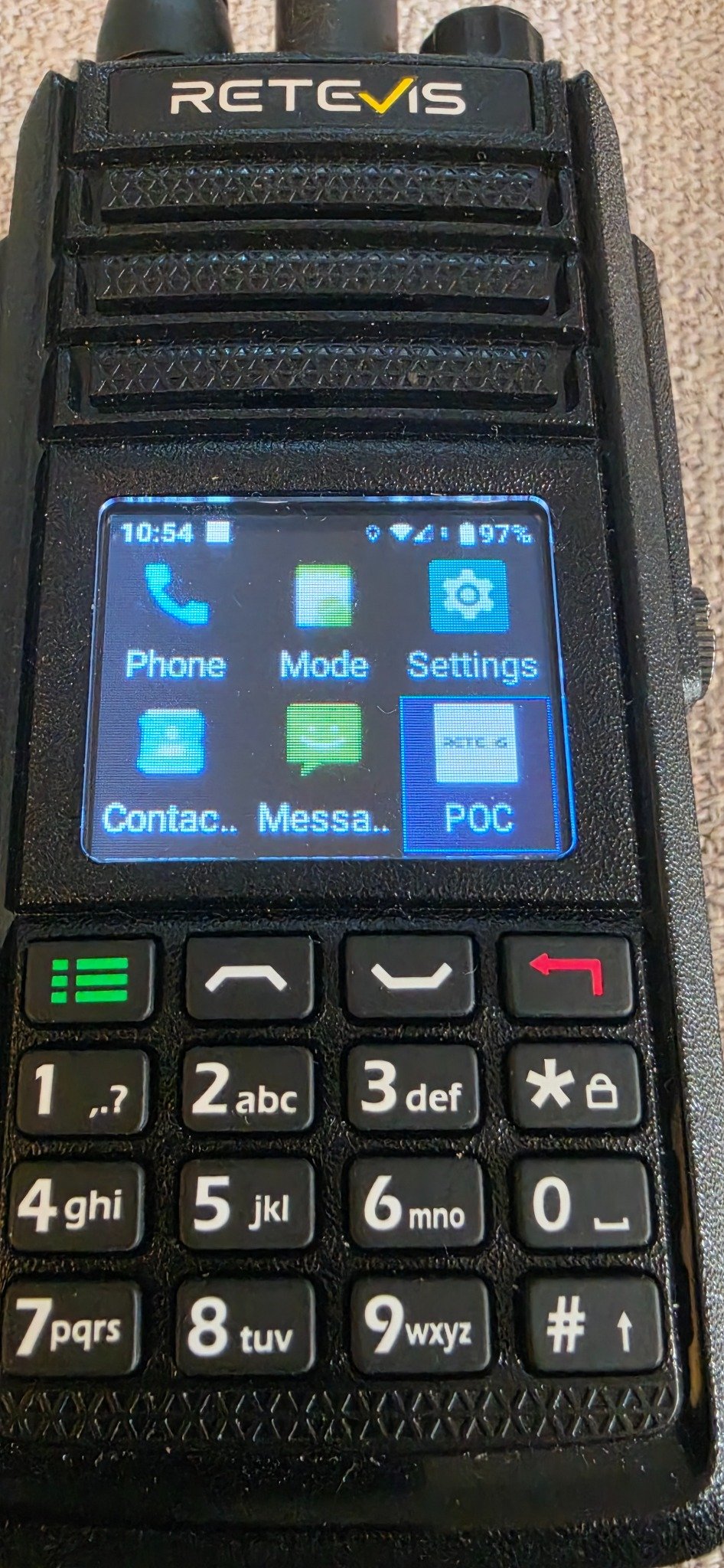
In my testing, the Phone menu allowed me to enter a number and appeared to attempt a call, but the call did not work. Text messaging likewise did not work. Their presence is worth explaining so buyers understand what they are seeing, but I would not count them as missing radio features. The working Retevis PoC contact and group functions are separate from these phone-like menus.
Final Impressions
For my needs, the MateTalk L2 makes the most sense as an affordable remote-base option that can also serve as an easy PoC system for my family. I like the durable hardware, the reassurance of its water-resistance rating, the excellent battery life, and the ability to leave the home radio plugged in. Good transmitted-audio reports with the compander disabled and accessible WAV recordings add to its usefulness.
There are compromises. The programming software and channel labeling are basic, the side-button assignments are narrow, and incoming PoC traffic can be blocked by analog reception. The lack of a bridge between Retevis PoC and a mobile app limits flexibility.
Even with those shortcomings, the L2 has provided a useful way to access my home-area radio activity from different parts of the country. Its combination of analog and PoC becomes most interesting when used as a remote base, whether for repeater access, simplex communication, or other authorized frequencies within the radio’s capabilities.
The Retevis MateTalk L2 is available individually or as a two-pack. Retevis supplied the 10% discount code RETEVISPOC10; check its eligibility when ordering.
Retevis supplied two radios with AT&T service for this review. Over a few months, I have used them remotely from different cities around the United States, primarily with one serving as a remote base at home. That application has been the most interesting part of my testing, but the radios have also provided an easy PoC communication option for my family. Along the way, I encountered some limitations, worked with Retevis on a firmware issue, and found several features worth highlighting.
Hardware and Everyday Use
I like the L2’s hardware. It feels durable, and the physical buttons and numeric keypad give it the familiar controls of a handheld radio. The color screen is useful, although direct sunlight calls for its brightest setting.
The IP67 rating is particularly attractive to me because I like fishing and spending time around water. I have drenched the radio without trouble, although I have not submerged it or attempted to independently verify its full immersion rating. Having that protection provides reassurance when using it in places where getting wet is a realistic possibility.
Battery life has been excellent in my use. For remote-base operation, the radio can also remain plugged in, making it practical to leave a unit at home without depending on its battery for extended operation. I connect the analog side to my base antenna when using it for ham radio, taking advantage of the home station’s antenna coverage.
The L2 also has its own dedicated external antenna for the cellular network. So far, I have not experienced problems with cellular connectivity during my travels. One of the first things I did was connect a radio to my home Wi-Fi, which was easy. That provides a convenient network connection for the unit remaining at home.
The card compartment sits behind the battery, with a SIM installed in the left-hand holder in the photo. Cellular data supplies the network connection when Wi-Fi is unavailable, allowing the portable L2 to reach the PoC service while away from home.
Four Operating Modes
The L2 offers Ang Mode, POC Mode, MIX Mode, and RPT Mode. Analog and PoC modes operate their respective communication systems, while MIX makes both available through the operating interface. RPT supplies the bridge between a PoC group and the selected analog channel. That distinction is important: having access to both systems in MIX mode does not automatically forward conversations between them.
One minor interface quirk is that the blue highlight follows the cursor, while a green check identifies the active mode. In the next photo, RPT is highlighted but MIX remains selected. The check mark is the useful indicator when determining which mode is actually in use.
Remote Base Operation
For me, the L2’s strongest application is as a relatively low-cost remote base. One radio provides the analog RF connection at home, while another accesses it through PoC. My home L2 is programmed for the local amateur repeater and connected to my base antenna. Audio from the portable travels over PoC to the home unit, which transmits on the repeater’s input frequency. Received repeater audio returns over PoC to the portable.
This has allowed me to participate in local repeater conversations while operating from different cities around the country. The portable does not need to be within RF range of the repeater; it needs a working network connection to the PoC service.
A repeater is only one application. The remote base can operate on a simplex channel, providing access to analog stations within its coverage area. Nor is the feature limited to amateur radio: it can be used on any frequency supported by the L2 that the operator is authorized to use. The remote base’s location and antenna establish its analog coverage, while PoC provides the connection to the distant operator.
The setup I tested requires at least two L2s, making the Retevis MateTalk L2 two-pack a practical starting point. Additional radios could provide multiple remote-base access points at different locations. Linked or daisy-chained arrangements could also extend communication between analog stations beyond their direct RF range. My hands-on testing has used two L2s; these larger arrangements are a logical extension of the bridging capability rather than configurations I have personally tested.
Working Through a Reliability Issue
Early in my remote-base testing, the home radio repeatedly crashed when analog and PoC transmissions arrived at the same time. That was a significant problem for a radio I wanted to use remotely, where physically restarting it would not always be possible.
I reported the behavior to Retevis. They supplied updated firmware and subsequently asked me to experiment with the Account Level setting in the Retevis Smart POC Management Platform portal. The updated firmware, combined with setting Account Level to 3 on both radios, appeared to resolve the crashes. Both changes deserve credit here. Simply saying that Account Level 3 fixed the problem would leave out the firmware update that preceded it. For readers interested in the same remote-base application, these findings are useful details to discuss with Retevis if similar behavior occurs.
The portal’s Remote Kill function can also be useful if PoC cross-mode operation hangs up causing a "stuck key" situation on the remote, but it has an important limitation: it does not prevent the radio from actually keying on the analog side. It should not be treated as a complete remote shutdown of the RF transmitter. If the stuck POC mode was causing the radio to key the analog side, doing the Remote Kill function will cause the analog side to unkey.
Family PoC Use and the Zello Limitation
My family has used the L2s for PoC communication and found them very easy to operate. That adds value beyond my remote-base experiments. The same pair can serve as dedicated PTT radios for family communication without requiring everyone to understand the analog or bridging features.
Zello support sounds like another way to expand that usefulness, but it is separate from the Retevis PoC service. The L2 does not bridge Retevis PoC traffic to Zello. Retevis also states that RPT mode does not bridge analog traffic to Zello. That is an unfortunate limitation. Competing PoC radios offer mobile-app access to their communication systems, allowing a phone to participate without another dedicated radio. Zello on the L2 does not provide that connection to the Retevis PoC system. I would have liked the flexibility of including a family member through a mobile app while the rest of us used the radios.
Dual Monitor Falls Short
Another limitation is how the L2 handles incoming traffic. When it is busy receiving an analog signal, it will not receive an incoming PoC call, even with Dual Monitor enabled.
On a busy analog channel, a lengthy conversation can therefore mean missing PoC traffic. The setting’s name suggests that both systems remain available, but my testing showed that analog reception blocks an incoming PoC call. This is worth understanding if you expect to use one handheld for local analog activity while remaining reachable over PoC.
Audio and Call Recording
With the analog Compander enabled, other stations reported that my transmitted audio sounded bad. I turned it off, and subsequent audio reports were good. Based on those reports, I recommend leaving the compander disabled for analog operation.
The recording feature is a useful extra. It records both PoC and analog conversations, including transmitted and received audio. Each transmission or reception becomes its own WAV file rather than being combined into one continuous recording.
The option is labeled Call Recording in the Basic Set menu. Recordings reside in \SD card\TYTPTT\wav, which is accessible from a computer when the radio is connected in USB mode. Even though you can find the files using the Android desktop app, they cannot be played back on the radio.
For programming the radio or for file management (like deleting the recordings), there is a quick key to turn on USB mode: Simply hold the # key after you plug in the USB cable.
Ordinary WAV files are a welcome choice because they can be copied to a computer for playback or retained as audio samples. Keeping each transmission and reception separate also makes it convenient to retrieve a particular exchange. Recording both communication systems is especially useful in a radio whose main attraction is connecting them.
Basic Programming and Limited Button Choices
Programming is rudimentary, although adding a VFO frequency to a memory channel from the radio is easy enough. The desktop software is similarly basic. One frustrating omission is the inability to give channels descriptive names: neither the radio nor the software lets me replace labels such as “CH-17” with a repeater name or another useful identifier.
The programmable side buttons offer some customization, but their choices are limited and divided between analog and PoC functions. The upper analog button can operate the emergency alarm, clear subaudio settings, toggle VOX, start scanning, activate monitor, select high or low power, or turn on the broadcast FM radio. The button’s power-selection function is restricted to frequency mode. I chose the FM radio function for mine.
The lower orange button serves the Retevis PoC side. Its options include Call, access to the PoC group-member page, a public-network alarm, and a local alarm. Call uses a configured PoC emergency contact; the emergency-contact and group-member references belong to the Retevis PoC service, not Zello. These choices provide a few shortcuts, but I would welcome a broader selection of assignable functions.
Bluetooth is another feature I left unexplored. There is a Bluetooth setting, but the limited options and descriptions did not make its intended uses particularly clear. Its presence belongs on the feature list, but I cannot offer a firsthand assessment of accessory compatibility or performance.
Android Menus and Their Limitations
The L2 uses an Android-based platform, which likely explains the Phone, Contacts, and Messages entries in its main menu. These should not be confused with advertised telephone or text-messaging capabilities. They appear to be remnants of the underlying operating system rather than intended features of the radio.
In my testing, the Phone menu allowed me to enter a number and appeared to attempt a call, but the call did not work. Text messaging likewise did not work. Their presence is worth explaining so buyers understand what they are seeing, but I would not count them as missing radio features. The working Retevis PoC contact and group functions are separate from these phone-like menus.
Final Impressions
For my needs, the MateTalk L2 makes the most sense as an affordable remote-base option that can also serve as an easy PoC system for my family. I like the durable hardware, the reassurance of its water-resistance rating, the excellent battery life, and the ability to leave the home radio plugged in. Good transmitted-audio reports with the compander disabled and accessible WAV recordings add to its usefulness.
There are compromises. The programming software and channel labeling are basic, the side-button assignments are narrow, and incoming PoC traffic can be blocked by analog reception. The lack of a bridge between Retevis PoC and a mobile app limits flexibility.
Even with those shortcomings, the L2 has provided a useful way to access my home-area radio activity from different parts of the country. Its combination of analog and PoC becomes most interesting when used as a remote base, whether for repeater access, simplex communication, or other authorized frequencies within the radio’s capabilities.
The Retevis MateTalk L2 is available individually or as a two-pack. Retevis supplied the 10% discount code RETEVISPOC10; check its eligibility when ordering.
