• You can now help support WorldwideDX when you shop on Amazon at no additional cost to you! Simply follow this Shop on Amazon link first and a portion of any purchase is sent to WorldwideDX to help with site costs.

President Lincoln 2+ AM/FM no Modulation

CB-Whisky

Member
Apr 14, 2022
15
1
13
64
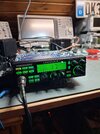
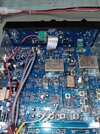
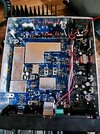
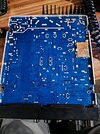
Hello, I need help with my President Lincoln 2+. There's no modulation on FM and AM, and of course not on SSB either. The carrier signal is present with the specified power.
Perhaps someone else has a Lincoln 2+ with the same or a similar problem?

Thanks in advance.

vy 73 Werner
 

Attachments

  • 20260310_230402.jpg
    20260310_230402.jpg
    1.5 MB · Views: 10
  • Download (4).jpg
    Download (4).jpg
    196.6 KB · Views: 12
  • Download (3).jpg
    Download (3).jpg
    192.6 KB · Views: 12
  • 20260307_235133.jpg
    20260307_235133.jpg
    2.7 MB · Views: 11

Hello, I need help with my President Lincoln 2+. There's no modulation on FM and AM, and of course not on SSB either. The carrier signal is present with the specified power.
Perhaps someone else has a Lincoln 2+ with the same or a similar problem?

Thanks in advance.

VY 73 Werner
 

Attachments

  • 20260310_230402.jpg
    20260310_230402.jpg
    1.5 MB · Views: 5
  • 20260307_235133.jpg
    20260307_235133.jpg
    2.7 MB · Views: 5
  • Download (4).jpg
    Download (4).jpg
    196.6 KB · Views: 4
  • Download (5).jpg
    Download (5).jpg
    169.8 KB · Views: 5
Use AF signal generator and scope and trace it from mic socket backwards. You'll find it within minutes.
My bet is cold solder joint at the mic socket or (and) cracked copper foil. Use DMM to check continuity.
Mike
 
A quick test to identify the possible area of trouble is to put the radio into the "PA" mode and plug an external speaker into the PA speaker jack on the back of the radio, with the mic. gain all the way up and the radio volume control about halfway up. Then, try keying up and talking. If you hear yourself, the problem is probably in the transmitter section or the microprocessor or switching circuits. If you don't hear yourself, it is probably something in the audio section, either amplification or switching. Before doing this test you should make absolutely sure you have a known working microphone connected to the radio and a known working external speaker. Your trouble could also rest under bad solder joints or the aftermath of someone working on the radio previously that left this present. You did not say if you had receive audio in your complaint which is helpful to know along with, is the carrier produced on frequency with what your radio display says. The microphone is always the #1 suspect with your description.
 
Assuming you have a good mic and the speaker is working properly it could be a bad audio IC chip. Newer radio's have lots of settings and controls, double check those as well.
 
A quick test to identify the possible area of trouble is to put the radio into the "PA" mode and plug an external speaker into the PA speaker jack on the back of the radio, with the mic. gain all the way up and the radio volume control about halfway up. Then, try keying up and talking. If you hear yourself, the problem is probably in the transmitter section or the microprocessor or switching circuits. If you don't hear yourself, it is probably something in the audio section, either amplification or switching. Before doing this test you should make absolutely sure you have a known working microphone connected to the radio and a known working external speaker. Your trouble could also rest under bad solder joints or the aftermath of someone working on the radio previously that left this present. You did not say if you had receive audio in your complaint which is helpful to know along with, is the carrier produced on frequency with what your radio display says. The microphone is always the #1 suspect with your description.

Hello Transresitor,

I just tried using the PA as recommended, but only a faint modulation is coming from the speaker. The TX carrier is fine on FM and AM. SSB is modulation-dependent, which isn't loud enough. The RX is all OK, RX everything is within spec.

Could the AM regulator be defective?

73 Thanks for the quick info

 
Assuming you have a good mic and the speaker is working properly it could be a bad audio IC chip. Newer radio's have lots of settings and controls, double check those as well.
Hello 9c1Driver,

I just tried using the PA as recommended, but only a faint modulation is coming from the speaker. The TX carrier is fine on FM and AM. SSB is modulation-dependent, which isn't loud enough. The RX is all OK, RX everything is within spec.

Could the AM Regulator be defective? Or the Finals (output transistors) Power is going out like they should


73 Thanks for the quick info
 
Hello 9c1Driver,

I just tried using the PA as recommended, but only a faint modulation is coming from the speaker. The TX carrier is fine on FM and AM. SSB is modulation-dependent, which isn't loud enough. The RX is all OK, RX everything is within spec.

Could the AM Regulator be defective? Or the Finals (output transistors) Power is going out like they should


73 Thanks for the quick info
The AM regulator is not relevant when in the PA mode. If the PA mode is functioning properly, that will establish that your microphone, mic. amp section and audio output IC is working. Yours does not, so I would be leaning more towards your mic. amp circuitry and switching. It is highly unlikely that the audio output IC is causing the problem because you said you have receive audio that is normal. One unanswered question that is important to the situation at hand is the history of how this problem came to be. Was the radio working properly and just quit, or have you obtained the radio in this condition. I have had radios brought in where someone had tried doing a "Hi-Fi" mod or direct inject mod, that they did not perform successfully, which resulted in your exact condition. One missing SMD component or damaged PCB trace can cause this. It is never fun trying to figure out what someone else did wrong on a radio like this. Signal tracing on a multilayered PCB is not a job for the weak at heart and requires a higher level of technical ability and equipment to get the job done. I don't have a service manual on the Lincoln II +, but I do for the Lincoln II, which I am attaching here for you. I don't know how much it differs from your actual radio, but it has PCB diagrams that you can compare to your radio. They may be very similar. Without having your radio in front of me, I can't say. Someone on here may know and can chime in. Before tracing the microphone signal path, I would suggest checking the ribbon cable and make sure it is seated properly with the pins lined up correctly. I have also seen this scenario when a mic. gain control was bad or totally oxidized. If you can get at the control to clean it, you might get lucky. If you have a signal tracer, that would be good place to start checking for mic. audio. You will find the mic. audio circuit on page 25 of the attached manual. The major players there are U500 and U501, which are NJM4558M op amps. I have had to replace these before in radios, but I don't find them to fail very often. One quick check you can do, is to leave the radio on for a few minutes and take your finger and touch each one briefly to see if they are abnormally hot. If so, it is probably bad. If you got this radio in this condition, I would also suggest looking in areas where people would be inclined to do modifications to the radio, for evidence of soldering having been done.

 

Attachments

  • Like
Reactions: Dr. Frankenstein

dxChat
Help Users
  • No one is chatting at the moment.
  • @ heartbreaker3473:
    Hello gentlemen and Ladies. I have the dreaded RCI-2990 receive issue where my radio gets distorted when people get close to my location. I found the C90 Capacitor, but I can not for the life of me find the C89 capacitor. Can or does anyone have a picture of the exact location of C89 ? Thank you in advance, Wes
  • @ AudioShockwav:
    Wes, it's better if you start a thread on the main forum, more people are going to see your question.
  • @ heartbreaker3473:
    Okay, sorry, will put in a forum
  • @ heartbreaker3473:
    I put it in the general disscution help area and started a new thread. Thank you for letting me know.