• You can now help support WorldwideDX when you shop on Amazon at no additional cost to you! Simply follow this Shop on Amazon link first and a portion of any purchase is sent to WorldwideDX to help with site costs.
  • The Father's Day Retevis RA89R Winner is Announced! Click Here for more info!

Cobra 2000 GTL

HavaV10

Active Member
May 24, 2023
201
41
38
58
Lake Havasu City, Arizona
Hello all. Working on a 1978 model Cobra 2000. It's been very chopped up and trying to get it back to stock. The issue with it, will the volume turned all the way down there is still white noise coming out of the speaker. Not loud but you can hear it. I put in a new Volume pot and did a full re-cap on the mother board with no change. Just thought I'd ask if someone might know what to look for that is cause this noise leak through the speaker. Thanks.
 

hmmm. yes, I had some radios with that problem.

the audio amp IC TA7222 goes bad.
all that crackly noise out the speaker.

more tests: put in PA mode and connect a speaker to
the "PA SP" jack. listen for the noise.

- Transmit in AM mode and listen on another radio.
key up, MIC gain all the way CCW (no audio in)


Also: on them radios, another "hack" that is done, is the TONE or RF GAIN
control will be wired in place of VR10 AM CARRIER POWER.
This hack is OK, if feeding a Palomar or Texas Star amplifier.
 
hmmm. yes, I had some radios with that problem.

the audio amp IC TA7222 goes bad.
all that crackly noise out the speaker.

more tests: put in PA mode and connect a speaker to
the "PA SP" jack. listen for the noise.

- Transmit in AM mode and listen on another radio.
key up, MIC gain all the way CCW (no audio in)


Also: on them radios, another "hack" that is done, is the TONE or RF GAIN
control will be wired in place of VR10 AM CARRIER POWER.
This hack is OK, if feeding a Palomar or Texas Star amplifier.
Thanks for writing me. Yeah the noise still comes out of the speaker when in PA mode. The sound full CCW is just a low noise smooth sound not the actual receive from the radio.
 
Have you recapped it? The audio IC can fail and make noise, but dry caps can cause noise also, especially if it is in the path as a coupling cap between stages or any that filter audio along the way. At almost half a century old, even the best caps can fail. A scope will payoff in dividends here.
 
Have you recapped it? The audio IC can fail and make noise, but dry caps can cause noise also, especially if it is in the path as a coupling cap between stages or any that filter audio along the way. At almost half a century old, even the best caps can fail. A scope will payoff in dividends here.
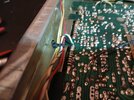
Yes sir I replaced all the caps with Nichicons. Ok in the photo you see a white/blue wire (far left) it goes to the course on the unlocked voicelock, when I remove that wire the low noise out of the speaker goes away but then the frequency counter is jumping around all over the place.
 

Attachments

  • 1000016053.jpg
    1000016053.jpg
    973.3 KB · Views: 4
Disconnecting the wire causes the varactor voltage to drop to zero (max capacitance) bringing the oscillator frequency to its minimum. Since this frequency is tripled for the loop mixer, the shift down in frequency may be enough to cause an out of lock condition. When the PLL goes out of lock, it mutes the audio on the input side of 7222. I believe this rules out any issue with the audio IC, although I don't believe it narrows down the source of the noise much.

Just about any component can be a noise source. Diodes, transistors, capacitors, resistors, they all can go bad and make noise. A sample of the noise might help, so would a non-contact audio probe.
 
  • Like
Reactions: NZ8N
I still don't think the audio IC should be cleared so easily, or the filtering, just because an IC can mute like it's supposed to. I also suspect the counter, they can make noise also, in fact they often do, but when working correctly it's negligible and largely unnoticed.

Try unplugging the power cord from the wall, turn the radio ON to drain away any residual, then unplug the white counter plug on the right side of the counter. Don't fiddle with it while it's powered, you can damage the input to the counter. Plug the radio power back into the wall and check for noise.

If noise is still present, do the same steps above except put back the white connector on the right of the counter and remove the rear power connector from the counter, check for noise.

If noise is still present, the counter isn't the source, restore all connections and start looking at the audio chain.

A clip of the noise would be very helpful.

 
  • Like
Reactions: NZ8N
I still don't think the audio IC should be cleared so easily, or the filtering, just because an IC can mute like it's supposed to. I also suspect the counter, they can make noise also, in fact they often do, but when working correctly it's negligible and largely unnoticed.

Try unplugging the power cord from the wall, turn the radio ON to drain away any residual, then unplug the white counter plug on the right side of the counter. Don't fiddle with it while it's powered, you can damage the input to the counter. Plug the radio power back into the wall and check for noise.

If noise is still present, do the same steps above except put back the white connector on the right of the counter and remove the rear power connector from the counter, check for noise.

If noise is still present, the counter isn't the source, restore all connections and start looking at the audio chain.

A clip of the noise would be very helpful.
thank you, I will try to get a video clip up of the low noise in the speaker soon. I thought about it what about putting a diode on the end of that white/blue wire? Just a thought?
 
Have you tried powering the radio by its DC jack and an external power supply? A 1978 radio should have at least one oddball fault from electrolytic capacitors reaching their use-by date. At least this doesn't require a soldering iron to try.

73
 
  • Like
Reactions: Cable Guy
Hava, it wouldn't hurt to check the ground wire on the counter. I believe with this radio, the ground wire needs to be attached to PCB ground, and not the chassis ground. Seems like that ground wire can cause the frequency counter to hop around like you mentioned.
 
I still don't think the audio IC should be cleared so easily, or the filtering, just because an IC can mute like it's supposed to.
The IC is not doing the muting, TR53 does that to the audio before it reaches the audio IC. If bringing the input of the audio IC to ground removes the noise, I would consider that conclusive proof the noise is not coming from the IC. Had this mute feature been internal to the IC, I would agree with you, but the muting is external. Since the IC is still amplifying with TR53 shorting the audio, any noise in the IC would still be amplified. It disappearing when out of lock suggests the noise is before the audio IC.
 
Last edited:
The IC is not doing the muting, TR53 does that to the audio before it reaches the audio IC. If bringing the input of the audio IC to ground removes the noise, I would consider that conclusive proof the noise is not coming from the IC. Had this mute feature been internal to the IC, I would agree with you, but the muting is external.
Yes, you are correct about that, and thank you. I'm not looking at a schematic until the basics have been checked first. In my experience, silicone junctions tie for second place with electrolytic capacitors, first place is tied with loose joints and user error. I sure wouldn't try to find a noise source without a scope.

Did you recap the counter and power supply as well?
 

dxChat
Help Users
  • No one is chatting at the moment.
  • dxBot:
    boog351 has left the room.
  • @ BJ radionut: