
• You can now help support WorldwideDX when you shop on Amazon at no additional cost to you! Simply follow this Shop on Amazon link first and a portion of any purchase is sent to WorldwideDX to help with site costs.

1st gen 2950 Question

Xjeepguy

Member
Oct 12, 2018
40
11
18
59
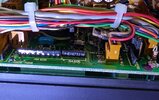
Hi guys and gals . Just picked up a 1st Gen RCI 2950 today , thing was like opening up a time capsule . Man I looked everywhere on the small board and NO jumpers are marked . So I snapped a pic of the front board and you can see the Jumper below the CPU reset , is that jumper on the correct side for 11M? Jumper is on the left pins and right 2 are open . Thanks for any info, been a while since I popped an oldie like this open . EPT295013Z.jpg
 

From my old database:
Find jumper J2, you will notice that it is on pins P3 and P4
If you remove it you will have coverage from 26.000-29.700 MHz
If you place it on pins P1 and P2 you will have coverage from 26.000-32.000 MHz
Now reset the CPU by pressing the button below J2
To get a channel read out locate J1, the jumper will be on pins P1 and P2, move it to P2 and P3.


Now when you press the lock button you will toggle between CB channels and the VFO readout !
 
I figured it out via the cpu reset under it :) . Noted on the mic socket , good to know , thanks . This ones going in the truck and will use the stock mic . Thanks
 

dxChat
Help Users
  • No one is chatting at the moment.