
• You can now help support WorldwideDX when you shop on Amazon at no additional cost to you! Simply follow this Shop on Amazon link first and a portion of any purchase is sent to WorldwideDX to help with site costs.

Anytone AT 5000

A disc capacitor donated a leg, I stuck it in the holes. Hold Function and turn it on to select HF mode. Afterwards, you can pull the white wire jumper out.

I already had the pin jumper to the left, might make a difference. Might not.
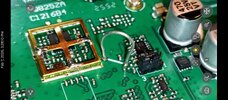
magnifier_20260207_152810 (1).jpg
AT-5000+10 meter(B).png
 
Last edited:
  • Like
Reactions: Eldorado828
A disc capacitor donated a leg, I stuck it in the holes. Hold Function and turn it on to select HF mode. Afterwards, you can pull the white wire jumper out.

Thank you for that information and thanks for being an early adopter. It is always a crap shoot when buying a radio in its infancy. I’m sure Anytone will have firmware updates coming in the months ahead.

I’m trying very hard to not buy another radio that I don’t really need…but they are making it difficult.
 
  • Like
Reactions: Shadetree Mechanic
A disc capacitor donated a leg, I stuck it in the holes. Hold Function and turn it on to select HF mode. Afterwards, you can pull the white wire jumper out.

I already had the pin jumper to the left, might make a difference. Might not.
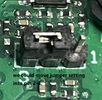
View attachment 76006
View attachment 76007
Original Amazon listing no longer shows up in a search, so any reviews are gone. Radio has been relisted HERE for $184.99 with $10 shipping. I may go for it now since you kindly posted the manual and band setting. Very helpful. I did notice that the manual for the Anytone and the Albrecht AE5900 are a bit different, even the buttons are labeled differently. Anytone did not define which key press is used for "back" in the menus, but the Albrecht manual says it's the EMG/MEM, which is the MEM/NB/ANL button on the Anytone. Is this what you found?
 
Original Amazon listing no longer shows up in a search, so any reviews are gone. Radio has been relisted HERE for $184.99 with $10 shipping. I may go for it now since you kindly posted the manual and band setting. Very helpful. I did notice that the manual for the Anytone and the Albrecht AE5900 are a bit different, even the buttons are labeled differently. Anytone did not define which key press is used for "back" in the menus, but the Albrecht manual says it's the EMG/MEM, which is the MEM/NB/ANL button on the Anytone. Is this what you found?
It's the bottom left button to back out of the menu, can't remember what it says. Strange that they relisted it, still being sold by Anytone. Maybe my review was too revealing? I had updated my review with a link to this thread, then when I was waiting for the update to go through, it was unlisted... I can still see the listing through my orders, and my update never went...
 
Last edited:
It's the bottom left button to back out of the menu, can't remember what it says. Strange that they relisted it, still being sold by Anytone. Maybe my review was too revealing? I had updated my review with a link to this thread, then when I was waiting for the update to go through, it was unlisted... I can still see the listing through my orders, and my update never went...
I had saved the original listing in one of my personal lists. About a week ago, after your review posted, it showed "currently unavailable". Today a search for Anytone AT-5000 popped up the new listing. Yes, bottom left button seems to be the one for both versions to back out of a menu.
 
  • Like
Reactions: Shadetree Mechanic
A disc capacitor donated a leg, I stuck it in the holes. Hold Function and turn it on to select HF mode. Afterwards, you can pull the white wire jumper out.

I already had the pin jumper to the left, might make a difference. Might not.

View attachment 76006
View attachment 76007
Any luck figuring out how to get into the Tx power setting? Probably be less interested if this rig is stuck at 4W.
 
Engineering Service Mode:
- Use at your own risk.
- Some settings need input from test equipment.
If you access a parameter that needs an input from test equipment and you have nothing hooked to the radio, the parameter is set to zero and you now have a door stop.


- Hold the knob and Mode button in while powering on.
The volume will be full blast static, briefly push power button to mute.

Good Luck
 
Anytone has published the manual and band setting to their website. It's in the CB Radio section. Link here. Interesting that the band selection no longer mentions the jumper wire J803, but now has different combinations of power up and button presses. You still need to move the jumper J802 to get the HF and HAM bands as well as the output power selections. Did not take a close look at the manual to see if there are any differences there compared to the version posted here by @Shadetree Mechanic. Radio is on order but won't be here for at least another week. Once I get it I'll see if the new band and power selections are as stated in this new document or if the wire jumper is still needed. No post yet for programming software.
Edit: Posted manual now has a pinout diagram for the microphone connector. Useful to build a programming cable if and when software is available.
 

Attachments

Last edited:
  • Like
Reactions: Shadetree Mechanic

dxChat
Help Users
  • No one is chatting at the moment.
  • @ Hambones amps:
    Does anyone know if you can replace the 2290 in a galaxy dx 93t twin turbine with a 2sc2879 red dot? If so, what would have to be tuned?
  • @ ShadowDelaware:
    Hambones the entire amp section would have to be retuned, and the rf transformers re wrapped.