• You can now help support WorldwideDX when you shop on Amazon at no additional cost to you! Simply follow this Shop on Amazon link first and a portion of any purchase is sent to WorldwideDX to help with site costs.
  • A Winner has been selected for the 2025 Radioddity Cyber Monday giveaway! Click Here to see who won!

Anytone Q6 Pro mic gain setting help !

FlyBoy50

Sr. Member
Feb 22, 2019
2,309
3,857
273
75
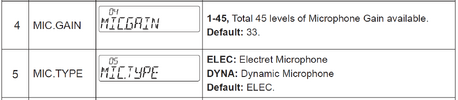
I pulled my Q6 Pro out of my Expedition because the SUV had to go to the repair garage for brake work. While I was at it I hooked it to my base antenna to try out a few days ago and made a contact who said my Audio was off which surprised & disappointed me. Well today I got searching for the Mic Gain in the menu and found my setting was #44 so I turned it down to the default which is 33 according to the manual and it is set for the default Mic Type. But seeing there is so many in here with that radio I got to wondering, What do most of you have your Mic Gain set at and if I could ask Why ? Thanks !
 

PS. and while we are at it, is there a tone setting in the menu ? and if so what is the best setting for that ?
 
Stating that your "audio is off" is a bit ambiguous. It could mean that its low, and/or distorted. If it was low, then increasing the mic gain or using a stronger mic would be the obvious solution. If distorted, it may be an improperly-adjusted (on non-functional) AMC and/or ALC circuit, which may in turn mean a poor tune-up job. If you have access to a 'scope you can quickly tell if it is overmodulated. if it is, then AMC/ALC are likely the issue.
 
  • Like
Reactions: FlyBoy50
Stating that your "audio is off" is a bit ambiguous. It could mean that its low, and/or distorted. If it was low, then increasing the mic gain or using a stronger mic would be the obvious solution. If distorted, it may be an improperly-adjusted (on non-functional) AMC and/or ALC circuit, which may in turn mean a poor tune-up job. If you have access to a 'scope you can quickly tell if it is overmodulated. if it is, then AMC/ALC are likely the issue.
Thanks for the come back Dave and I hope to get the time to check it out further. I'm getting close to getting my buddy to come up and talk to me from that radio so I can hear for myself. The trouble with him he is a old CBer from back in the day and can't keep his hands off the controls so you never know what he's doing so sometimes it's hard to make determinations. If all else fails I know your just 3 hours away and someone I can count on.

Thanks
Mike
 
I appreciate the vote of confidence, but hopefully we can figure it out without you having to make two 3-hour drives!
Yeah that 3 hr drive one way is getting harder to do at 75 yo with arthritis and bath room calls, but the old heart still likes a road trip ! LOL
 
  • Like
Reactions: jrd426
The best way to listen to your transmit audio, is with a second radio with earphones and no antenna. I use a Cobra 148 as a station monitor and give my audio a quick check every time I power up.
That sounds like a good idea if I get a good set of headphones with a small jack. I have a good set but they are from back in the day when I listened to stereo music. Can the listening radio be in the same room with out a antenna hooked to it ? That would be great because my Galaxy 2547 sets right there and all I'd have to do is unhook the antenna and speakers. I sure wish the old Radio Schacks were still around for picking up adapters but if I dig around I might have one amongst my stash. Thanks for getting my Old Noodle cooking again ! LOL
 
  • Like
Reactions: Shadetree Mechanic
Just turn the mic gain up to around 42 and run with it. Ask for an audio report and adjust accordingly.
That's interesting because both of my Q6 Pro had the mic gain in the 40s. The one I pulled and put in my radio room was at 44 and the one in my car I don't remember but it was in the 40s and I changed it to the default 33. I don't know if Trucks CB shop set them there or if I did when I first got them and was experimenting in the menu. I think I'm first going to try what Shadetree suggested because you can't always trust what you hear when your DXing. There are some Stinkers out there in radio land that might be Mischievous just to mess you up. LOL Thanks for the input and I don't take it lightly. It is locked in and ready for a try !
 
LOL, you haven't mentioned what kind of mic it is. Kinda need to know that before advice can be given...
Stock, Aftermarket, Dynamic, Electret, Noise cancelling, etc.
 
LOL, you haven't mentioned what kind of mic it is. Kinda need to know that before advice can be given...
Stock, Aftermarket, Dynamic, Electret, Noise cancelling, etc.
stock mic set at default in menu. Electret thank you
 
1763736583640.png
Mic type should be Electret.
As for Mic gain, I would set it while driving the Expedition and key the mic without talking. Set the mic gain so no RF is coming out from background/road noise.

A nice plug & play upgrade is the President Digi Mic. The channel buttons don't work - and never will because pin 6 doesn't have 13.2v, but the different NB levels do work and it works very well to reduce background noise and has plenty of audio drive for SSB. A nice Noise Cancelling power mic that is powered by the radio and never needs batteries.
 
  • Like
Reactions: FlyBoy50
LOL, you haven't mentioned what kind of mic it is. Kinda need to know that before advice can be given...
Stock, Aftermarket, Dynamic, Electret, Noise cancelling, etc.
stock mic set at default in menu. Electret thank you
A nice plug & play upgrade is the President Digi Mic. The channel buttons don't work - and never will because pin 6 doesn't have 13.2v, but the different NB levels do work and it works very well to reduce background noise and has plenty of audio drive for SSB. A nice Noise Cancelling power mic that is powered by the radio and never needs batteries.
I have a President Digimic I bought for my Lincoln II+ to replace the stock mic that went bad. I'm feeling rather radio equipment poor at the moment so I will check out everything I have already and try to make it All It Can Be ! LOL I feel like I'm overloaded with radios and accessories but I'm sure some in here would laugh and say I haven't seen anything yet. Sounds like we have some real Radio Addicts in here. LOL
 
  • Like
Reactions: Shadetree Mechanic
The best way to listen to your transmit audio, is with a second radio with earphones and no antenna. I use a Cobra 148 as a station monitor and give my audio a quick check every time I power up.
Tried your method tonight and it worked good because my 2547 already has a large headphone jack in the front and turned the mic gain back up to 44. But tomorrow I'll try it on lsb with the amp turned on to see if there is distortion from the amp. Thank for the tip and I'll try it with my Cobra 2000 also because that has the large port in the front also. Thanks again for the tip. Who says you can't teach a old dog new tricks ! I've been barking at the moon a long time. Bow Wow !
 
  • Like
Reactions: Shadetree Mechanic

dxChat
Help Users
  • No one is chatting at the moment.