• You can now help support WorldwideDX when you shop on Amazon at no additional cost to you! Simply follow this Shop on Amazon link first and a portion of any purchase is sent to WorldwideDX to help with site costs.
  • Retevis is giving away a new RA89R for Father's Day! Click Here for more info!

CAT control a Moonraker Titan V2

31PAT055

New Member
May 17, 2026
5
0
1
IN50we
bsky.app
Hi Ppl...!
I've a Moonraker Titan V2 radio and I'm thinking on trying to make a CAT control for it via UART since the radio has data in/out...
Does anyone already tried this? I would like to have some advice and input on the possibility. My plan is to have an SDR Panadapter for RX and control the radio via CAT control for TX...
Any advice will be welcome, thanks...!
 

Welcome to the forum!

Interesting concept to try to interface that radio for both CAT control and a pan adapter.

I don't know about that radio but I do know many of the export CB radio's like that only use the USB port for radio menu settings to be set via computer. Also firmware updates can be done thru the USB port too. CAT control data isn't built into the ones I know of but UART is a way to get there if you are knowledgeable about that protocol. It seems to be very complex way to get the CAT control data needed from a CB type radio.

If you use SSB and FM modes and not much AM, maybe consider getting an SDR Amateur radio like the Icom 7300 which already has CAT control built in for easy computer interfacing and it has it's own SDR waterfall display. The radio has an external monitor port so you can see the radio on a bigger screen.

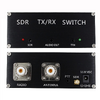
As for Pan adapters, these are fairly easy to interface via an IF tap line from inside the radio or using a simple SDR interface switch box which pulls the RF data from the coax line and protects the radio during transmit with the built in TR/RX auto switch.

One issue with using SDR interfaces is there can be up to a 3dB loss in RX because the RX signal is being split from an IF tap. Probably not so if using a SDR interface box like the one in the pic below. Also there is a bit of latency between the SDR software and radio which is noticeable if you listen and compare the radio's audio output and the SDR audio out from your computers sound card.

Good luck with your project and post it on the forum if you are successful!

Até lago

1781098056577.png
 
Last edited:
Welcome to the forum!

Interesting concept to try to interface that radio for both CAT control and a pan adapter.

I don't know about that radio but I do know many of the export CB radio's like that only use the USB port for radio menu settings to be set via computer. Also firmware updates can be done thru the USB port too. CAT control data isn't built into the ones I know of but UART is a way to get there if you are knowledgeable about that protocol. It seems to be very complex way to get the CAT control data needed from a CB type radio.

If you use SSB and FM modes and not much AM, maybe consider getting an SDR Amateur radio like the Icom 7300 which already has CAT control built in for easy computer interfacing and it has it's own SDR waterfall display. The radio has an external monitor port so you can see the radio on a bigger screen.

As for Pan adapters, these are fairly easy to interface via an IF tap line from inside the radio or using a simple SDR interface switch box which pulls the RF data from the coax line and protects the radio during transmit with the built in TR/RX auto switch.

One issue with using SDR interfaces is there can be up to a 3dB loss in RX because the RX signal is being split from an IF tap. Probably not so if using a SDR interface box like the one in the pic below. Also there is a bit of latency between the SDR software and radio which is noticeable if you listen and compare the radio's audio output and the SDR audio out from your computers sound card.

Good luck with your project and post it on the forum if you are successful!

Até lago

View attachment 76951

I already have an antenna switcher/shearer like that one... what I would like was to make the radio control the SDR frequencies and the other way around... My radio has an UART Data in/out but no CAT control input/output I will try it out anyway. I'm not a ver firmware savvy guy but I can try it out to see if the radio receive external data inputs... Let's see fi I get lucky on my quest... It would be great because there are loads of people with similar radios that would love to do the same thing.
About the advice on buying a better radio already with CAT control, I would love to but I'n'm a budget radio operator and on my current economy I can't afford to buy ay expensive stuff,s so I've to use what I already have... But thanks for the advice...!
 
I looked up this radio and I see no data port which typically are USB ports. I can't see how this radio (or any current CB/export radio) can ever be modified to have CAT control.

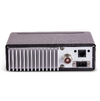
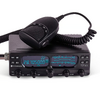
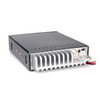
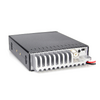
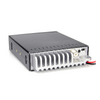
Here is a pic of the back and front of the radio from the manufactures website.

1781441292189.png
1781441549425.png


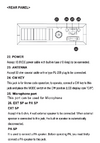
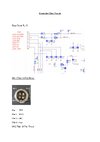
According to the manual, what looks like a data port is for a rear mic input that uses mics with a modular connector.


1781441477279.png
 
If you notice it has a RJ45 port, and on that port you have the microphone connection replicated and also Serial DATA TX/RX... USB ports are consumer serial connectors... But there are other connectors for data transfer and RJ45 is the standard... As I''m seeing you are not very savvy on data communications are you...?
 

Attachments

  • Titan_pinouts_AC-images-0.jpg
    Titan_pinouts_AC-images-0.jpg
    298.9 KB · Views: 3
Last edited:
BTW... there aren't any radios with USB ports on the market except for charging batteries... So I reckon you must learn a bit more before you decide to give any advice to anyone... And BTW I have the manual and the radio... So... all of your info was sincerely quite redundant...!
 
BTW... there aren't any radios with USB ports on the market except for charging batteries... So I reckon you must learn a bit more before you decide to give any advice to anyone... And BTW I have the manual and the radio... So... all of your info was sincerely quite redundant...!
I reckon you must learn a bit more before making statements like that. You are so wrong!

My Anytone 6666 Pro has a USB port and I use it for radio programming. Many other such as some of the Stryker models have them too. None of these are capable of CAT control out of the box.

Notice the USB port on the back of the Anytone 6666Pro radio and the ad the states this radio is in fact PC programmable.

You came here for advice and you been told by myself and sp5it that it's not likely possible with your current radio but don't want to accept it. To add CAT control to a CB/export radio is beyond the scope of most radio techs and probably isn't practical to do so.

If you want to play like an Amateur radio with full CAT control then as I stated before, get a real Amateur radio. There are many used modern Amateur rigs that can be bought for decent prices that have CAT control capabilities.

Since you are an electronics engineer and savvy on data communications, why are you asking here?

1781478648305.png
file_01716175103684.webp
 

Attachments

  • 1781479271426.png
    1781479271426.png
    349.2 KB · Views: 0
  • 1781479315608.png
    1781479315608.png
    349.2 KB · Views: 0
Last edited:
Currently there is no CAT control for the Moonraker Titan V2. While there are two UART pins you can play with, nobody's talking about what they've found there. As in, no documented baud rate, no documented data structure, nothing.

If CAT control is possible, Moonraker isn't releasing any details. Which is odd as it would be a selling point for FT8 enthusiasts.

If you want to have CAT control you'll most likely have to monitor the CPU-UART connection and figure out which commands do what, then implement a way to get your own commands into that stream without the CPU overriding them.

All this assumes the UART isn't just there for flashing firmware. Which is what I'm leaning towards as it's a relatively cheap consumer grade device.

Anyways, good luck and I hope you do figure it out. Would make for a fascinating series of posts.
 
  • Like
Reactions: AudioShockwav

dxChat
Help Users
  • No one is chatting at the moment.
  • @ iw7ed:
    hello
  • dxBot:
    boog351 has left the room.
  • @ BJ radionut: