

You are using an out of date browser. It may not display this or other websites correctly.
You should upgrade or use an alternative browser.
You should upgrade or use an alternative browser.
-
You can now help support WorldwideDX when you shop on Amazon at no additional cost to you! Simply follow this Shop on Amazon link first and a portion of any purchase is sent to WorldwideDX to help with site costs.
-
The Winners of the three Retevis radios 16 Anniversary giveaway are announced!! Click Here to find out if you won!
Cobra 29GTL/LTD ?
- Thread starter Techno1
- Start date
Just wanted to try one in a 29 as I sell a lot of channel kits for these radios and would be great for the 80 extra channels so no channel chart is needed.

We adopted the habit of unhooking the ground side of the input cable and inserting a .001uf disc cap from the wire to the pcb ground foil. This removed ground-loop buzz noises.counter noise back feed.
73

So further testing is that TP3 or R17 on the cobra 29ltd/gtl is the receive 16.270 ch1 and 16.710 ch 40 minus the 10.695.
I was thinking about a small relay controlled by the pin 3 keyup pin on the Cobra 29s/25s/ most 4 pin radios.
I did not see in the directions on how to set the off set as it will need a +10.695 in the receive mode. Ill check the directions again There was 1 in Chinese i have the English directions and nothing on setting the offset.
I was thinking about a small relay controlled by the pin 3 keyup pin on the Cobra 29s/25s/ most 4 pin radios.
I did not see in the directions on how to set the off set as it will need a +10.695 in the receive mode. Ill check the directions again There was 1 in Chinese i have the English directions and nothing on setting the offset.
So I got the OLED counters and 1 was damaged. Those Chinese suck for packaging using a plastic bag to ship it in all the ways from China to USA.
Filed with paypal and sent to the Chinese company the pictures. So now I have one in hand for now.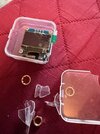
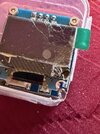
Filed with paypal and sent to the Chinese company the pictures. So now I have one in hand for now.


Jezz ....So I got the OLED counters and 1 was damaged. Those Chinese suck for packaging using a plastic bag to ship it in all the ways from China to USA.
Filed with paypal and sent to the Chinese company the pictures. So now I have one in hand for now.View attachment 76380View attachment 76381
I would make a claim and see if they can mail another one with no return needed.
You know I have seen a lot of overseas retail people shipping stuff like that.
A friend got a AT quad 6 pro off the web and they stuffed the radio in a bag and sent it in the factory box.
No packaging no bubble wrap nothing at all to protect the radio.
73
Jeff
I did make a claim with Paypal and also with Aliexpress in progress.
Thing that sucks is a waste of 2 weeks and if I want another gonna be another 2 weeks. Yes their packaging sucks putting that is a plastic bag and the case it was in is like glass it shattered. If it was shatter proof would of survived.
Hey what do the Chinese know about shipping to the USA.
Sent them and paypal all the pictures.
Thing that sucks is a waste of 2 weeks and if I want another gonna be another 2 weeks. Yes their packaging sucks putting that is a plastic bag and the case it was in is like glass it shattered. If it was shatter proof would of survived.
Hey what do the Chinese know about shipping to the USA.
Sent them and paypal all the pictures.

from specific AI search on AliExpress, research further if required.I did not see in the directions on how to set the off set as it will need a +10.695 in the receive mode. Ill check the directions again There was 1 in Chinese i have the English directions and nothing on setting the offset.
To configure the frequency offsets on your
PLJ-096OLED-H1
, follow the dual-button operation steps below. These devices typically use a combination of short and long presses to navigate the menu.
 AliExpress +2
Configuration Steps
- Enter Setup Mode: With the device powered on, press and hold the SET (or similar primary function) button until the display changes to the configuration menu.
- Navigate to IF Settings: Use short presses of the buttons to cycle through the menu options until you see "IF1" or "IF2".
- Adjust the Offset Value:
- Once in the IF setting, the digits will typically flash.
- Use the buttons to increment or decrement the value in 100 Hz steps.
- The range is 0 to 99.9999 MHz.
- Set Mode (Add/Subtract): After setting the numerical value, you can usually toggle between "+" (Plus) for additive mode or "-" (Minus) for subtractive mode.
- Save and Exit: Once configured, either wait for the screen to auto-save or long-press the SET button to exit. The settings are automatically saved to the internal EEPROM and will be loaded every time you power on.
 AliExpress +5
Switching Between IF1 and IF2
The PLJ-096OLED-H1 supports two independent IF offsets. On many versions of this hardware, switching between the two is handled by a physical hardware pin (often Pin 4 on the programming header):
 Skycraft Surplus +2
Translated from the manual flowchart...
Quick Guide to the Buttons:
graph TD
%% Main Menu Flow
Start([Frequency Display Interface]) -- "Long press K1: Power Off" --- Off[Power Off State]
Off -- "Long press K1: Power On" --- Start
Start -- "Short press K1" --> IF_Set[IF Offset Value Setting]
%% IF Setting Sub-menu
subgraph "IF Setting Detail"
IF_Set -- "Display" --> Sign[+ 00.0000 Add IF]
Sign -- "K2" --> SignMinus[- 00.0000 Subtract IF]
SignMinus -- "K2" --> Sign
Sign & SignMinus -- "K1" --> HighDigit[+ 00.0000]
HighDigit -- "K2 cycles 0-9" --> HighDigitVal[+ 90.0000]
HighDigit -- "K1" --> MidDigit[+ 00.0000]
MidDigit -- "K2 cycles 0-9" --> MidDigitVal[+ 09.0000]
MidDigit -- "K1 (to next digits...)" --> LowDigit[+ 00.0000]
LowDigit -- "K2 cycles 0-9" --> LowDigitVal[+ 00.0009]
LowDigit -- "K1" --> FinishIF[IF setting complete, return to Frequency Display]
end
%% Other Settings
IF_Set -- "K1" --> Filter[Display Filter]
Filter -- "Display" --> FilterOn[ON]
FilterOn -- "K2" --> FilterOff[OFF]
FilterOff -- "K2" --> FilterOn
FilterOn & FilterOff -- "K1" --> Return1[Return to Frequency Display]
Filter -- "K1" --> UART[UART Output Format]
UART -- "Display" --> M1[MODE 1]
M1 -- "K2" --> M2[MODE 2]
M2 -- "K2" --> M1
M1 & M2 -- "K1" --> Return2[Return to Frequency Display]
UART -- "K1" --> FW[Firmware Version]
FW -- "Display" --> Ver[20250514]
Ver -- "K1" --> Start
Quick Guide to the Buttons:
- To move the cursor: Short press K1. It cycles through the plus/minus sign, then each digit from left to right.
- To change a number: Press K2. It increments the flashing digit from 0 through 9.
- To save and exit: Keep pressing K1 until you have passed the last decimal digit; the device will then return to the main measurement screen.
graph TD
%% Main Menu Flow
Start([Frequency Display Interface]) -- "Long press K1: Power Off" --- Off[Power Off State]
Off -- "Long press K1: Power On" --- Start
Start -- "Short press K1" --> IF_Set[IF Offset Value Setting]
%% IF Setting Sub-menu
subgraph "IF Setting Detail"
IF_Set -- "Display" --> Sign[+ 00.0000 Add IF]
Sign -- "K2" --> SignMinus[- 00.0000 Subtract IF]
SignMinus -- "K2" --> Sign
Sign & SignMinus -- "K1" --> HighDigit[+ 00.0000]
HighDigit -- "K2 cycles 0-9" --> HighDigitVal[+ 90.0000]
HighDigit -- "K1" --> MidDigit[+ 00.0000]
MidDigit -- "K2 cycles 0-9" --> MidDigitVal[+ 09.0000]
MidDigit -- "K1 (to next digits...)" --> LowDigit[+ 00.0000]
LowDigit -- "K2 cycles 0-9" --> LowDigitVal[+ 00.0009]
LowDigit -- "K1" --> FinishIF[IF setting complete, return to Frequency Display]
end
%% Other Settings
IF_Set -- "K1" --> Filter[Display Filter]
Filter -- "Display" --> FilterOn[ON]
FilterOn -- "K2" --> FilterOff[OFF]
FilterOff -- "K2" --> FilterOn
FilterOn & FilterOff -- "K1" --> Return1[Return to Frequency Display]
Filter -- "K1" --> UART[UART Output Format]
UART -- "Display" --> M1[MODE 1]
M1 -- "K2" --> M2[MODE 2]
M2 -- "K2" --> M1
M1 & M2 -- "K1" --> Return2[Return to Frequency Display]
UART -- "K1" --> FW[Firmware Version]
FW -- "Display" --> Ver[20250514]
Ver -- "K1" --> Start
Thanks for all the info on setting the off sets will try in a few days after i get a response from the Chinese i got the bad display from
dxChat