• You can now help support WorldwideDX when you shop on Amazon at no additional cost to you! Simply follow this Shop on Amazon link first and a portion of any purchase is sent to WorldwideDX to help with site costs.

Help Please Galaxy 55 The Frequency Is Going Crazy

blake25537

Active Member
Mar 10, 2019
76
27
28
58
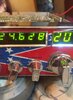
on 11 meter the Frequency Counter on channel 20 is showing 24.630 and the lat two numbers keeps changing can anyone explain how to repair this problem please

Thanks
 

Attachments

  • 72387521_507875180002220_7080166373850087424_n.jpg
    72387521_507875180002220_7080166373850087424_n.jpg
    78.2 KB · Views: 10

First question to ask is if the radio is off frequency, and the counter is simply reporting it to you. If you can hear the channel you should be hearing, that points to a failure in the counter. And if you can't hear anyone on a channel where you should be hearing them, the radio's PLL circuit has lost its grip on the channel frequency and the counter is working like it should.


If it's over 20 years old, the 10.24 MHz crystal could be the culprit. They have used a higher-quality crystal since those days, and this failure is not as common as it used to be.

Soldering failures in the front corner where the PLL is located are very common. We see a lot of radios with that circuit board with soldering faults.

73

 

dxChat
Help Users
  • No one is chatting at the moment.
  • @ heartbreaker3473:
    Hello gentlemen and Ladies. I have the dreaded RCI-2990 receive issue where my radio gets distorted when people get close to my location. I found the C90 Capacitor, but I can not for the life of me find the C89 capacitor. Can or does anyone have a picture of the exact location of C89 ? Thank you in advance, Wes
  • @ AudioShockwav:
    Wes, it's better if you start a thread on the main forum, more people are going to see your question.
  • @ heartbreaker3473:
    Okay, sorry, will put in a forum
  • @ heartbreaker3473:
    I put it in the general disscution help area and started a new thread. Thank you for letting me know.