

I’m excited to share QK4 Android Mobile, a new Android phone-focused remote application for the Elecraft K4/K4D.
Source code and the Android releases are available at:
https://github.com/worldwidedx/QK4-Android
QK4 Mobile is a GPL derivative of Mike Garcia KF5O’s excellent QK4 project. The goal was not to reinvent the radio-control plumbing that QK4 already proved on Windows and macOS. Instead, we preserved the known-good K4 connection, CAT control, panadapter streaming, RX audio, and microphone TX architecture—and built a genuinely usable touch-first operating interface around it.
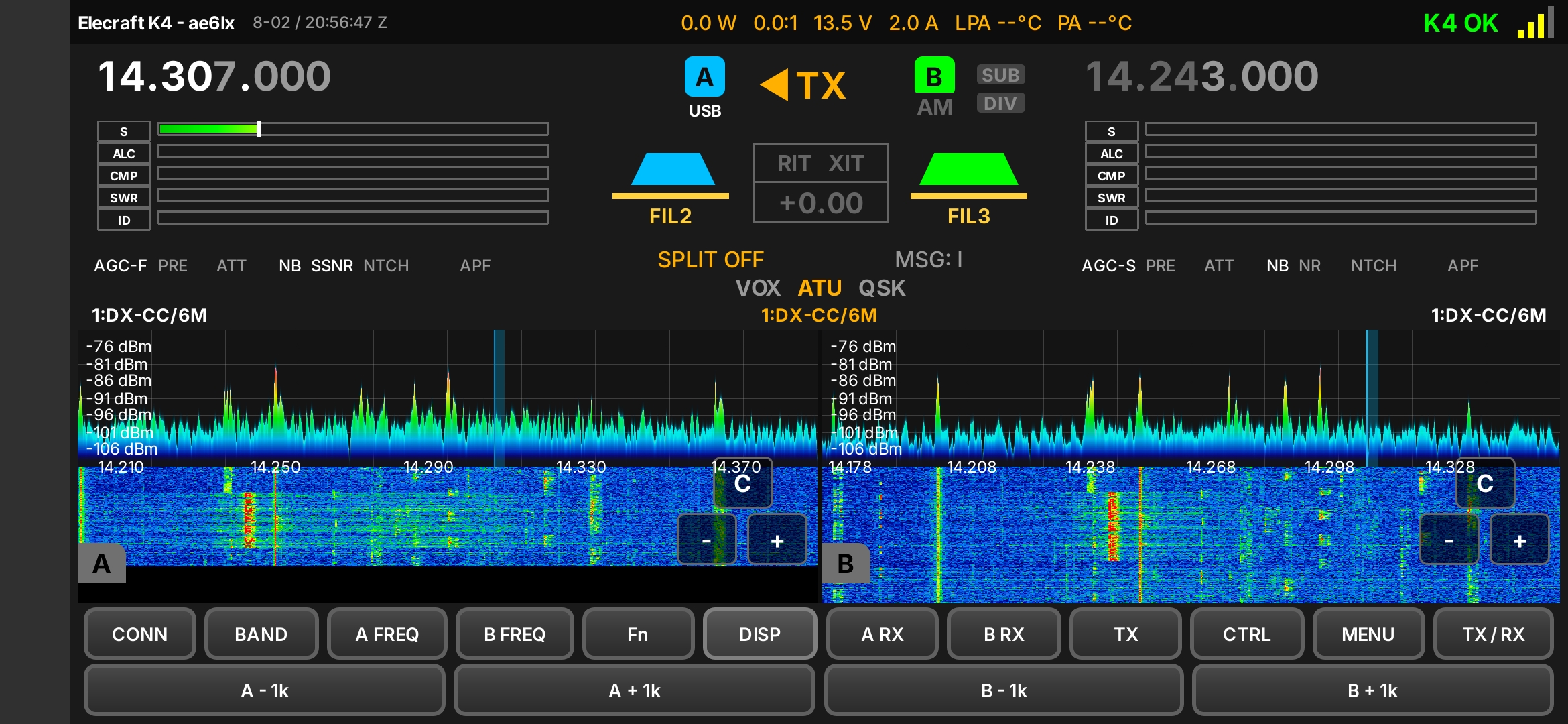
The challenge was that a K4 is a very capable radio with a lot of controls, and the regular QK4 assumes a large screen, keyboard, mouse wheel, hover behavior, and right-click. None of that translates directly to a phone. Simply shrinking the desktop interface produced overlapping buttons, controls off-screen, unreadable status indicators, and no practical way to operate the radio.
QK4 Android Mobile has been redesigned around landscape phone operation:
Give it a try and let me know what you think. Report bugs, compatibility issues, and usability feedback here.
Credit where it is due: QK4 Mobile is built on the outstanding core work in QK4 by Mike Garcia, KF5O. The Android adaptation and touch-first UX work are by WorldwideDX.com.
Source code and the Android releases are available at:
https://github.com/worldwidedx/QK4-Android
QK4 Mobile is a GPL derivative of Mike Garcia KF5O’s excellent QK4 project. The goal was not to reinvent the radio-control plumbing that QK4 already proved on Windows and macOS. Instead, we preserved the known-good K4 connection, CAT control, panadapter streaming, RX audio, and microphone TX architecture—and built a genuinely usable touch-first operating interface around it.
The challenge was that a K4 is a very capable radio with a lot of controls, and the regular QK4 assumes a large screen, keyboard, mouse wheel, hover behavior, and right-click. None of that translates directly to a phone. Simply shrinking the desktop interface produced overlapping buttons, controls off-screen, unreadable status indicators, and no practical way to operate the radio.
QK4 Android Mobile has been redesigned around landscape phone operation:
- The main console keeps the information that matters during operation visible: VFO A and B frequencies, transmit-VFO selection, split status, meter information, receiver status indicators, antenna information, filter/passband information, panadapter, waterfall, and a clearly accessible PTT.
- The spectrum and waterfall are designed as the center of the operating experience rather than an afterthought. The initial display is a balanced 50/50 spectrum/waterfall split, and the operator can still adjust waterfall height when desired.
- The panadapter is touch-tunable. You can tap or drag to move frequency, and it respects the tuning step selected on the frequency display.
- Frequency operation is designed for fingers, not a keyboard: direct frequency entry uses an on-screen keypad, while selecting a digit in the displayed frequency selects that VFO’s tuning rate—just as on the radio. If you select the MHz digit, touch tuning moves in MHz; select the kHz digit, and it tunes in kHz.
- The app supports both VFOs, including selecting the transmit VFO, split operation, independent main/sub receiver functions, receiver audio controls, and VFO-specific status.
- Long press replaces right-click. Many QK4 controls have a primary action and a secondary/alternate action. In QK4 Android Mobile, a normal tap anywhere on the button always performs the primary action, while a deliberate long press invokes the alternate function.
- Sliders replace mouse-wheel controls. Power, mic level, filter bandwidth, filter shift, main RF, and sub RF controls are operated through touch sliders rather than a mouse wheel.
- Touch jog replaces wheel-based RIT/XIT adjustment. Enable RIT or XIT, long press the status on the main display, and a purpose-built jog control appears for precise offset adjustment.
- Finger scrolling is deliberately separated from button presses. The control panels contain many K4 functions, so scrolling was tuned to avoid accidentally activating a control while dragging through the panel.
- Secondary controls are organized into touch panels rather than forced onto one crowded screen. The main console stays focused on operating the radio. CTRL, TX, DISP, FN, Main RX, and Sub RX panels provide access to deeper K4 functions in a way that remains reachable on a phone.
- The interface gives feedback after a command. When a function changes something not permanently obvious on the main screen—such as a noise blanker, notch, antenna selection, or similar control—the app provides an on-screen confirmation.
- Popup placement and panel sizing were repeatedly refined to stay within the phone viewport. This includes controls, frequency dialogs, macro editing, waterfall settings, antenna/status rows, and feedback overlays.
- TCP/TLS K4 profile management, RX audio streaming, microphone TX audio, and PTT.
- Main and sub AF controls.
- Direct frequency entry for either VFO.
- Touch controls for panadapter span, centering, waterfall appearance, and local Peak Hold.
- A persistent local red Peak Hold trace.
- Waterfall color-range adjustment using the K4-style 5–30 range.
- CW text decode.
- Editable and executable F1–F8 message macros.
- Mode-aware filter controls and indicators.
- RIT/XIT, antenna, noise reduction, noise blanker, notch, VOX, ATU, and many other K4 controls through touch panels.
Give it a try and let me know what you think. Report bugs, compatibility issues, and usability feedback here.
Credit where it is due: QK4 Mobile is built on the outstanding core work in QK4 by Mike Garcia, KF5O. The Android adaptation and touch-first UX work are by WorldwideDX.com.
