

Push‑to‑Talk over Cellular (POC) radios occupy a strange middle ground in the communications world. They’re not traditional RF radios, and they’re not smartphones — but they borrow elements from both. Most POC systems are built for enterprise fleets and require dealer provisioning, recurring service fees, and management portals that feel like they were designed for organizations, not individuals. Radioddity’s Tomolink takes a very different approach. After testing four units across the U.S. and even internationally, it’s clear that Radioddity is trying to make POC accessible without pretending these devices replace RF when the grid goes down.
Setup and Group Management: No Dealer Portal
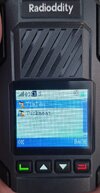
I started by creating my own talk group directly from the Super‑PTT phone app. Pairing all four radios took only a few minutes, and from that point forward I managed everything from my phone — naming and renaming each unit as I refined different use cases with my family. The Tomolink lets you handle group calling, point‑to‑point calling, and user management without ever touching a dealer portal or proprietary provisioning software. That alone separates it from most POC offerings, which typically require a Windows‑only portal or a dealer login just to change a call group. Here's an example of two radios named "Tuck1" and "Tuck2" in the "Tuckmeat" group.
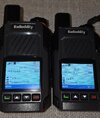
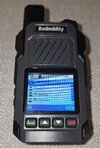
Both the Tomolink radio and the Super‑PTT app are simple but functional. You can see who’s online, send voice messages, and manage groups on the fly. It’s not overloaded with enterprise features, but that’s the point — this is POC for normal people, not a dispatch console. By default, when you PTT, you talk to the entire group, but by using the buttons on the side, you can pick an individual and "call" them directly. It even rings like an old-schoold radio
POC in Crowded Environments: Where These Radios Shine
The Tomolink becomes genuinely useful in places where smartphones fail. Anyone who has tried to text or call at a music festival, a packed ball game, a NASCAR race, or a County Fair knows how quickly a modern phone becomes useless when tens of thousands of people are hammering the same tower. POC radios operate on a different slice of the network, and during my testing the Tomolinks stayed responsive even when my phone’s data connection slowed to a crawl.
To be clear, these are not emergency radios. If the network goes down, these go down with it. They don’t replace RF in a disaster, and they’re not meant to. But for day‑to‑day communication in congested areas — where you just need quick, reliable comms — they offer a level of consistency that smartphones simply can’t match.
Compared to RapidRadios and other major POC vendors, this is a dramatic shift. For example, RapidRadios advertises “no monthly fees,” but their radios cost about twice as much as the Tomolink. You’re essentially paying the service cost up front — and you still don’t get the self‑managed setup or on‑device group control that Radioddity includes.
Battery Life and Hardware: Better Than Expected
Battery life on the Tomolink is solid. The 2500 mAh pack consistently gave me a full day of use, even with frequent transmissions and constant network connectivity. In lighter use, I could stretch it into a second day. It’s not a monster battery by any means, but it’s well‑matched to the radio’s power profile and intended use.
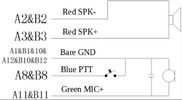
On the side of the radio is a USB‑C port — but not for charging. It’s actually an accessory port for a speaker/mic headset that Radioddity hasn’t released yet. The pinout is non‑standard, so anyone wanting to homebrew an accessory will need to map it out manually. For those that want to home-brew something, here's the pinout:
The radios don’t carry an official IP rating, but they feel durable. The casing is solid, the buttons have good travel, and the radios I tested worked just fine with light splashes without issue. I wouldn’t take them swimming, but for everyday use they seem more rugged than the price suggests.
Coverage Testing Across the U.S.
To see how well the Tomolinks held up outside my home area, I tested them across a wide geographic spread. I used them throughout Southern California, then on a cross‑country trip from Orlando to Los Angeles, and later in Phoenix and Nashville. Coverage remained consistent, audio quality stayed stable, and the radios never dropped off the network in any of the regions I tested. For a device that’s supposed to “just work,” they did exactly that.
International Surprise: They Worked in Italy
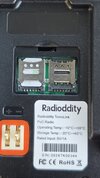
Radioddity markets the Tomolink as a North‑America‑only device, and the included SIM is indeed intended for use in the U.S. and Canada. But each radio includes a second SIM slot for other regions. Here's the inside with the included SIM and an extra slot if you want to add one for another region:
But here's the suprise: I gave one unit with only the North America SIM to my son for his honeymoon trip to Italy, and we were able to communicate between Italy and Los Angeles without any issues. Despite the documentation saying these radios shouldn’t function outside North America, they did. Here's a youtube short as proof!
User‑Controlled Groups: Anyone Can Create and Switch Between Channels
One of the most practical advantages of the Tomolink system is that any owner can create their own groups without needing a dealer, a portal login, or any kind of centralized administrator. If you buy a set of these radios for your family, your event crew, or a small business, you are the system operator. Using the SuperPTT app, you can create as many groups as you need, assign radios to them, rename them, and reorganize them on the fly.
If you’re heading to an event and only need two of the radios, creating a temporary group is just as simple. Open the SuperPTT app, make a new group on the fly, add the two radios you want, and the update pushes over the air within seconds. Turn the selector dial on top of the radio to switch to that new group, and you’re ready to go. You can even set an expiration date for the group in the app so it automatically disappears when you’re done.
The radios themselves support multiple groups at once, and switching between them is as simple as turning the selector dial on the top of the unit. Each position corresponds to a different talk group, and the radio announces the group name as you switch. It feels like a traditional multi‑channel radio — but with the flexibility of cloud‑based management. Here's what it looks like with two groups on the same radio:
Interoperability: Why POC Radios Don’t Talk to Each Other
One thing worth clarifying — and something newcomers to POC often misunderstand — is that POC radios are not interoperable across brands unless they’re running the same underlying platform. A Tomolink can’t talk to a RapidRadios unit, and neither can talk to a Retevis POC radio, because each vendor is essentially using its own “app” as the transport layer. It’s no different than how Signal users can’t message WhatsApp users, even though both are messaging apps running on the same phone networks. The hardware isn’t the barrier — the software ecosystem is.
Radioddity uses its Super‑PTT system. RapidRadios uses a different backend. Retevis uses yet another. None of these systems federate, and none are designed to. That’s not a flaw in the Tomolink specifically — it’s simply how the POC world works. Unless two radios are on the same platform, with the same login and the same backend servers, they might as well be speaking different languages. For families or small teams who all buy the same radios, this isn’t a problem. But it’s important to understand that POC is not like analog or digital RF where interoperability is built into the standard. POC is closer to a walled‑garden messaging service that happens to use a radio‑shaped device.
Tomolink vs. RapidRadios: Two Very Different Philosophies
RapidRadios has been one of the more visible POC vendors in the consumer space, but their model is very different from Radioddity’s. Even though RapidRadios advertises “no monthly fees,” their radios still cost about twice as much as the Tomolink. You’re essentially paying the service cost up front — and you still don’t get the self‑managed setup or on‑device group control that Radioddity includes. RapidRadios also requires you to contact them any time you want to change groups, while Radioddity lets you create, edit, and delete groups yourself in the SuperPTT app within seconds.
The Tomolink flips the traditional POC model on its head: no dealer, no portal, no recurring fees, and full user control. Other companies liek RapidRadios work just fine, but it still follows the older, more rigid provisioning philosophy. Radioddity’s approach is simply more flexible and more accessible for normal users.
Final Thoughts
The Tomolink stands out because it’s inexpensive, infinitely expandable, and completely DIY‑managed. There are no fees, no dealer lock‑ins, and no hidden costs waiting to show up later. If you want to add more radios, you just buy them and drop them into your existing groups — the system scales as far as you need it to without ever requiring outside help. For families, small teams, travel groups, or anyone who wants simple, reliable comms without subscriptions, it’s one of the most approachable POC options available.
I have to be honest: as a ham radio guy, I was pretty skeptical about this whole POC radio thing. Having managed a HUGE Nextel account back in the day, I just thought it was more of the same. It kind-of is, but it's more consumer friendly. They do serve a very useful purpose, and for whatever reason, my adult kids with their own families think they are cool and want more of them. I can't explain why they think they're cool...but they do. So it seems that Radioddity is onto something.
These radios are offered direct from Radioddity's website and at the time of this writing are about $150 for a pair:

 www.radioddity.com
Setup and Group Management: No Dealer Portal
I started by creating my own talk group directly from the Super‑PTT phone app. Pairing all four radios took only a few minutes, and from that point forward I managed everything from my phone — naming and renaming each unit as I refined different use cases with my family. The Tomolink lets you handle group calling, point‑to‑point calling, and user management without ever touching a dealer portal or proprietary provisioning software. That alone separates it from most POC offerings, which typically require a Windows‑only portal or a dealer login just to change a call group. Here's an example of two radios named "Tuck1" and "Tuck2" in the "Tuckmeat" group.
Both the Tomolink radio and the Super‑PTT app are simple but functional. You can see who’s online, send voice messages, and manage groups on the fly. It’s not overloaded with enterprise features, but that’s the point — this is POC for normal people, not a dispatch console. By default, when you PTT, you talk to the entire group, but by using the buttons on the side, you can pick an individual and "call" them directly. It even rings like an old-schoold radio
POC in Crowded Environments: Where These Radios Shine
The Tomolink becomes genuinely useful in places where smartphones fail. Anyone who has tried to text or call at a music festival, a packed ball game, a NASCAR race, or a County Fair knows how quickly a modern phone becomes useless when tens of thousands of people are hammering the same tower. POC radios operate on a different slice of the network, and during my testing the Tomolinks stayed responsive even when my phone’s data connection slowed to a crawl.
To be clear, these are not emergency radios. If the network goes down, these go down with it. They don’t replace RF in a disaster, and they’re not meant to. But for day‑to‑day communication in congested areas — where you just need quick, reliable comms — they offer a level of consistency that smartphones simply can’t match.
Three Years of Included Service: A Major Differentiator
One of the biggest departures from the rest of the POC market is Radioddity’s service model. The Tomolink includes a pre‑installed SIM with three years of service and no recurring fees. Most POC radios require a monthly subscription or a bring‑your‑own‑SIM setup, which adds cost and complexity. Radioddity’s approach is refreshingly simple: the radios arrive active, and you don’t pay anything additional for three full years.Compared to RapidRadios and other major POC vendors, this is a dramatic shift. For example, RapidRadios advertises “no monthly fees,” but their radios cost about twice as much as the Tomolink. You’re essentially paying the service cost up front — and you still don’t get the self‑managed setup or on‑device group control that Radioddity includes.
Battery Life and Hardware: Better Than Expected
Battery life on the Tomolink is solid. The 2500 mAh pack consistently gave me a full day of use, even with frequent transmissions and constant network connectivity. In lighter use, I could stretch it into a second day. It’s not a monster battery by any means, but it’s well‑matched to the radio’s power profile and intended use.
On the side of the radio is a USB‑C port — but not for charging. It’s actually an accessory port for a speaker/mic headset that Radioddity hasn’t released yet. The pinout is non‑standard, so anyone wanting to homebrew an accessory will need to map it out manually. For those that want to home-brew something, here's the pinout:
The radios don’t carry an official IP rating, but they feel durable. The casing is solid, the buttons have good travel, and the radios I tested worked just fine with light splashes without issue. I wouldn’t take them swimming, but for everyday use they seem more rugged than the price suggests.
Coverage Testing Across the U.S.
To see how well the Tomolinks held up outside my home area, I tested them across a wide geographic spread. I used them throughout Southern California, then on a cross‑country trip from Orlando to Los Angeles, and later in Phoenix and Nashville. Coverage remained consistent, audio quality stayed stable, and the radios never dropped off the network in any of the regions I tested. For a device that’s supposed to “just work,” they did exactly that.
International Surprise: They Worked in Italy
Radioddity markets the Tomolink as a North‑America‑only device, and the included SIM is indeed intended for use in the U.S. and Canada. But each radio includes a second SIM slot for other regions. Here's the inside with the included SIM and an extra slot if you want to add one for another region:
But here's the suprise: I gave one unit with only the North America SIM to my son for his honeymoon trip to Italy, and we were able to communicate between Italy and Los Angeles without any issues. Despite the documentation saying these radios shouldn’t function outside North America, they did. Here's a youtube short as proof!
User‑Controlled Groups: Anyone Can Create and Switch Between Channels
One of the most practical advantages of the Tomolink system is that any owner can create their own groups without needing a dealer, a portal login, or any kind of centralized administrator. If you buy a set of these radios for your family, your event crew, or a small business, you are the system operator. Using the SuperPTT app, you can create as many groups as you need, assign radios to them, rename them, and reorganize them on the fly.
If you’re heading to an event and only need two of the radios, creating a temporary group is just as simple. Open the SuperPTT app, make a new group on the fly, add the two radios you want, and the update pushes over the air within seconds. Turn the selector dial on top of the radio to switch to that new group, and you’re ready to go. You can even set an expiration date for the group in the app so it automatically disappears when you’re done.
The radios themselves support multiple groups at once, and switching between them is as simple as turning the selector dial on the top of the unit. Each position corresponds to a different talk group, and the radio announces the group name as you switch. It feels like a traditional multi‑channel radio — but with the flexibility of cloud‑based management. Here's what it looks like with two groups on the same radio:
Interoperability: Why POC Radios Don’t Talk to Each Other
One thing worth clarifying — and something newcomers to POC often misunderstand — is that POC radios are not interoperable across brands unless they’re running the same underlying platform. A Tomolink can’t talk to a RapidRadios unit, and neither can talk to a Retevis POC radio, because each vendor is essentially using its own “app” as the transport layer. It’s no different than how Signal users can’t message WhatsApp users, even though both are messaging apps running on the same phone networks. The hardware isn’t the barrier — the software ecosystem is.
Radioddity uses its Super‑PTT system. RapidRadios uses a different backend. Retevis uses yet another. None of these systems federate, and none are designed to. That’s not a flaw in the Tomolink specifically — it’s simply how the POC world works. Unless two radios are on the same platform, with the same login and the same backend servers, they might as well be speaking different languages. For families or small teams who all buy the same radios, this isn’t a problem. But it’s important to understand that POC is not like analog or digital RF where interoperability is built into the standard. POC is closer to a walled‑garden messaging service that happens to use a radio‑shaped device.
Tomolink vs. RapidRadios: Two Very Different Philosophies
RapidRadios has been one of the more visible POC vendors in the consumer space, but their model is very different from Radioddity’s. Even though RapidRadios advertises “no monthly fees,” their radios still cost about twice as much as the Tomolink. You’re essentially paying the service cost up front — and you still don’t get the self‑managed setup or on‑device group control that Radioddity includes. RapidRadios also requires you to contact them any time you want to change groups, while Radioddity lets you create, edit, and delete groups yourself in the SuperPTT app within seconds.
The Tomolink flips the traditional POC model on its head: no dealer, no portal, no recurring fees, and full user control. Other companies liek RapidRadios work just fine, but it still follows the older, more rigid provisioning philosophy. Radioddity’s approach is simply more flexible and more accessible for normal users.
Final Thoughts
The Tomolink stands out because it’s inexpensive, infinitely expandable, and completely DIY‑managed. There are no fees, no dealer lock‑ins, and no hidden costs waiting to show up later. If you want to add more radios, you just buy them and drop them into your existing groups — the system scales as far as you need it to without ever requiring outside help. For families, small teams, travel groups, or anyone who wants simple, reliable comms without subscriptions, it’s one of the most approachable POC options available.
I have to be honest: as a ham radio guy, I was pretty skeptical about this whole POC radio thing. Having managed a HUGE Nextel account back in the day, I just thought it was more of the same. It kind-of is, but it's more consumer friendly. They do serve a very useful purpose, and for whatever reason, my adult kids with their own families think they are cool and want more of them. I can't explain why they think they're cool...but they do. So it seems that Radioddity is onto something.
These radios are offered direct from Radioddity's website and at the time of this writing are about $150 for a pair:
Radioddity TomoLink POC Radio | 4G LTE Coverage | Phone-to-Radio Talk
Radioddity TomoLink: The Ultimate Wide-Area Communication Solution. Experience the next generation of team coordination with the Radioddity TomoLink. Unlike traditional walkie-talkies limited by distance and terrain, the TomoLink utilizes the 4G LTE cellular network to provide an unlimited...
www.radioddity.com

