

Not sure if this is the right place to put this, but I thought others may find it useful. This is for linux and I have no idea how to do it in windows. Next year, when I forget how to do this and AI costs too much, this will hopefully be here.
A coworker picked me up some cheap AA batteries and I want to compare them to energizers, so I figured I would make a constant current load and monitor the battery voltage over time. I don't have a data logger, but a nano has an ADC input and a USB port. This is how to send the ADC voltage to a CSV file in linux.
Upload this to a nano:
The ADC_REFERENCE is the 5v supply (your USB cable voltage). USB hubs can drop voltage. Mine was 4.6v and it has a big affect on accuracy so measure it and enter your actual supply voltage here (just measure between GND and 5v on the arduino pins and put that where 5.00 is). A0 is the ADC pin it is measuring. Its a 10 bit ADC which is where 1023 comes from, its the number of discrete levels it can detect. The 4 after voltage is the number of decimal places it displays. The delay is how often it sends data to the computer in milliseconds. Speeds are limited my ADC clock and USB speeds.
Now close it. You don't want the IDE open when you run the logger and you don't want the logger running when you try to program the nano.
Install the python serial comms package
You should already know this from the arduino IDE, but see what USB port the nano is on
Make a datalogger directory under your user home dir (or wherever)
In that folder, you gotta add a little python script. Start by making the file.
That should open the editor. Paste this in with ctrl+shift+v making sure to get the port right.
To start logging, use this:
and to stop logging, use ctrl+c
Terminal will look like this:
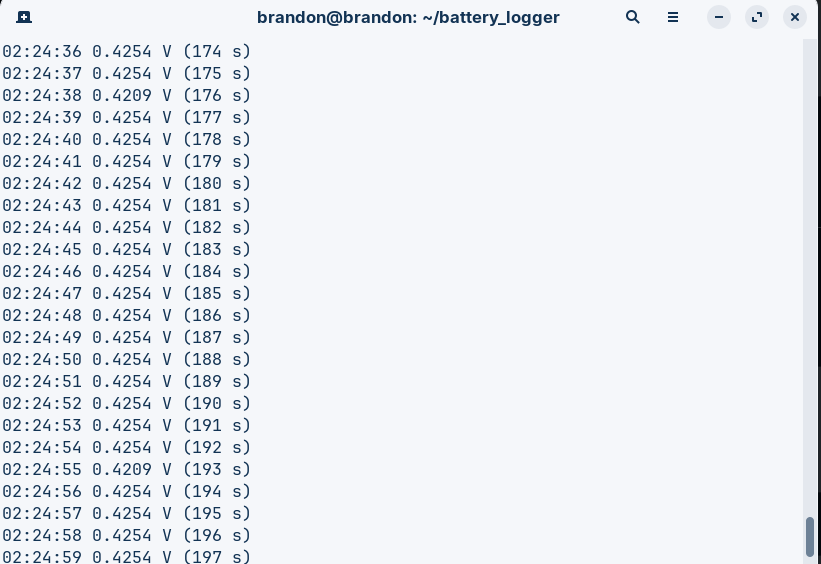
and the csv looks like this:
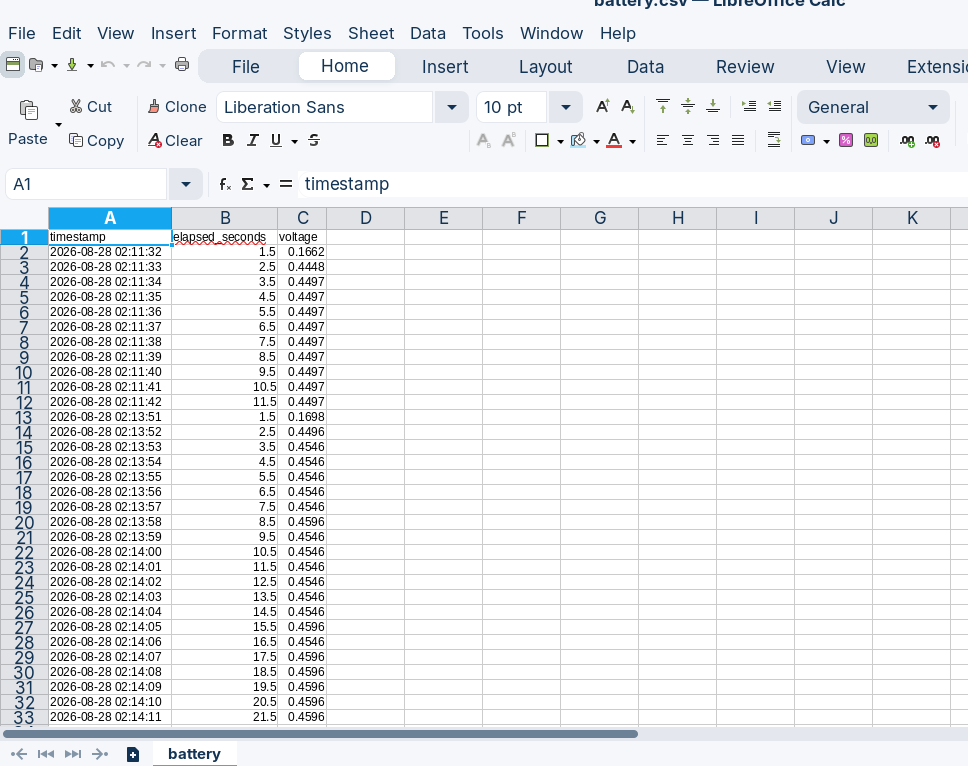
Note how in this test it was reading 0.4596v. I had the ADC pin floating when I did this. Don't expect it to show 0v unless it is actually connected to something that is at 0v. Also, you need to keep it within the nano's supply voltage so resistively divide and scale as appropriate. A zener to absorb spikes and a 1k resistor wouldn't be a bad idea either.
Now I need to make a constant current load and kill some batteries. I'm guessing 100mA is a good starting point. I have this bad habit of starting new projects when others are still incomplete lol
A coworker picked me up some cheap AA batteries and I want to compare them to energizers, so I figured I would make a constant current load and monitor the battery voltage over time. I don't have a data logger, but a nano has an ADC input and a USB port. This is how to send the ADC voltage to a CSV file in linux.
Upload this to a nano:
const float ADC_REFERENCE = 5.00;
void setup() {
Serial.begin(115200);
}
void loop() {
int raw = analogRead(A0);
float voltage = raw * (ADC_REFERENCE / 1023.0);
Serial.println(voltage, 4);
delay(1000);
}
The ADC_REFERENCE is the 5v supply (your USB cable voltage). USB hubs can drop voltage. Mine was 4.6v and it has a big affect on accuracy so measure it and enter your actual supply voltage here (just measure between GND and 5v on the arduino pins and put that where 5.00 is). A0 is the ADC pin it is measuring. Its a 10 bit ADC which is where 1023 comes from, its the number of discrete levels it can detect. The 4 after voltage is the number of decimal places it displays. The delay is how often it sends data to the computer in milliseconds. Speeds are limited my ADC clock and USB speeds.
Now close it. You don't want the IDE open when you run the logger and you don't want the logger running when you try to program the nano.
Install the python serial comms package
sudo apt install python3-serial
You should already know this from the arduino IDE, but see what USB port the nano is on
ls /dev/ttyUSB* /dev/ttyACM*
You should see something like "/dev/ttyUSB0". Remember that for the python script.Make a datalogger directory under your user home dir (or wherever)
mkdir -p ~/data_logger
In that folder, you gotta add a little python script. Start by making the file.
nano ~/data_logger/logger.py
That should open the editor. Paste this in with ctrl+shift+v making sure to get the port right.
import serial
import csv
from datetime import datetime
import os
PORT = "/dev/ttyUSB0"
BAUD = 115200
FILE = "data.csv"
ser = serial.Serial(PORT, BAUD, timeout=2)
file_exists = os.path.exists(FILE)
file_empty = not file_exists or os.path.getsize(FILE) == 0
start_time = datetime.now()
try:
with open(FILE, "a", newline="") as f:
writer = csv.writer(f)
if file_empty:
writer.writerow(["timestamp", "elapsed_seconds", "voltage"])
f.flush()
print("Data logger started.")
print("Writing to:", os.path.abspath(FILE))
print("Press Ctrl+C to stop.\n")
while True:
line = ser.readline().decode("utf-8", errors="ignore").strip()
if not line:
continue
try:
voltage = float(line)
except ValueError:
continue
now = datetime.now()
elapsed = (now - start_time).total_seconds()
writer.writerow([
now.strftime("%Y-%m-%d %H:%M:%S"),
f"{elapsed:.1f}",
f"{voltage:.4f}"
])
f.flush()
print(
now.strftime("%H:%M:%S"),
f"{voltage:.4f} V",
f"({elapsed:.0f} s)"
)
except KeyboardInterrupt:
print("\nLogging stopped.")
finally:
ser.close()
Then save (ctrl+o then Enter) and exit (ctrl+x)To start logging, use this:
cd ~/data_logger
python3 logger.py
and to stop logging, use ctrl+c
Terminal will look like this:
and the csv looks like this:
Note how in this test it was reading 0.4596v. I had the ADC pin floating when I did this. Don't expect it to show 0v unless it is actually connected to something that is at 0v. Also, you need to keep it within the nano's supply voltage so resistively divide and scale as appropriate. A zener to absorb spikes and a 1k resistor wouldn't be a bad idea either.
Now I need to make a constant current load and kill some batteries. I'm guessing 100mA is a good starting point. I have this bad habit of starting new projects when others are still incomplete lol
Last edited:
