Radio is now available on alibaba.com Looks like $270 total for one radio with shipping tax and import fees. https://www.alibaba.com/product-detail/Anytone-AT-5000-10-Meter-Mobile_1601670969754.html

You are using an out of date browser. It may not display this or other websites correctly.
You should upgrade or use an alternative browser.
You should upgrade or use an alternative browser.
-
You can now help support WorldwideDX when you shop on Amazon at no additional cost to you! Simply follow this Shop on Amazon link first and a portion of any purchase is sent to WorldwideDX to help with site costs.
Anytone AT 5000
- Thread starter AudioShockwav
- Start date

Just ordered on Amazon in USDelboy's blog says coming soon. Amazon doesn't have it yet. I'm a bit intrigued at least.
73's

I just ordered one from Amazon too, $190 + $10 shipping. They are selling it as a cb, so hopefully the conversion is a jumper .

Well nevermind I found it but how does one get it into export mode?I had a look on Amazon and did not find it. Could someone elighten me of the link please?
Retro
73's

There is a video somewhere on the tube and it's a jumper plus or minus the white wire.
Haven't spotted it yet but thanks.There is a video somewhere on the tube and it's a jumper plus or minus the white wire.
Got mine today, neat little radio. It has great audio with 3k/4k selectable transmit and of course the noise reduction works great too. Out of the box, it is a CB and does about 18 watts on SSB, perfect for a KL203. I moved the jumper inside and lost WX, and the display changed from US to UK? (I forget now.) But did not give any extra bands or channels. I tried holding ptt and some buttons while powering up, but did not find the right combination, and there is no white wire to cut.
I plan on replacing the Anytone Smart with this in my wife's explorer, we will see...
I plan on replacing the Anytone Smart with this in my wife's explorer, we will see...
Running it through it's paces with a kl 203, getting great reports. I didn't realize just how small it is, makes the 203 look big by comparison. This one is the CB version, but the one on the Anytone website is 10 meter, darn. The VFO mode for the function key on the mic doesn't work, and the clarifier in the menu can only be selected for RX. I have to email the seller and they will email the manual. I asked them if they have the programming software, there is nothing on the Anytone website. Maybe something can be changed in the software to enable the VFO and upper channels?
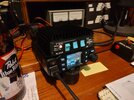
This one is the CB version, but the one on the Anytone website is 10 meter, darn.
The circuit board has two through holes with a white line printed between them, near the jumper pins. I think (I don’t know for sure) you may need to solder a wire between them in order to get the full HF capability. I haven’t seen any definitive videos on this yet, but that may be what is required.
Tried to grab a screen shot from a video on YT on the Albrecht AE5900 (same radio). Ignore the arrow, but you can see the white line running between the two through holes directly above the arrow.
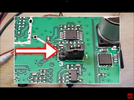
I just got some information from the seller, I will post it up soon. I think you are right, it might need a jumper in there. I will see if I can try it this afternoon.The circuit board has two through holes with a white line printed between them, near the jumper pins. I think (I don’t know for sure) you may need to solder a wire between them in order to get the full HF capability. I haven’t seen any definitive videos on this yet, but that may be what is required.
Tried to grab a screen shot from a video on YT on the Albrecht AE5900 (same radio). Ignore the arrow, but you can see the white line running between the two through holes directly above the arrow.
View attachment 75996
Thanks for this. Was going to order from Amazon, but not available now. Want to work 10M, so hoping the white wire jumper enables this. SimonTheWizard has this video (Link) showing CB, HF and HAM. He did not say how he got to these selections. The image above is from a video showing that moving the jumper from 1-2 to 2-3 enables a menu with three RF power selections of Low, Medium and High. Factory setting locks in low for CB it seems.I just got some information from the seller, I will post it up soon. I think you are right, it might need a jumper in there. I will see if I can try it this afternoon.
Edit: Fixed a bad link to the video.
Last edited:
Found a link to the Albrecht AE5900 manual. Firmware may be different for the Anytone AT-5000, but I imagine it is similar. English starts on Page 27. Manual
Attached is the information I got from the seller. I still haven't found the programing file, not even on the Anytone website yet.
I also tried adding the white wire, and now can select between HF, Ham and CB. Hold Function on power up.
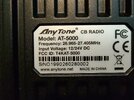
Here is a picture of my serial number. Maybe this was a vendor sample that they sold me?
.
I also tried adding the white wire, and now can select between HF, Ham and CB. Hold Function on power up.
Here is a picture of my serial number. Maybe this was a vendor sample that they sold me?
.
Attachments
Last edited:
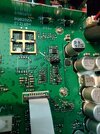
Here is a picture of the board, the white line on the board between the two holes is where the white wire would be.