• You can now help support WorldwideDX when you shop on Amazon at no additional cost to you! Simply follow this Shop on Amazon link first and a portion of any purchase is sent to WorldwideDX to help with site costs.

Luiton LT-310SDR

Shadetree Mechanic

Delaware Base Station 808
I Support WorldwideDX.com!
Oct 23, 2017
7,833
14,126
798
54
The First State (Delaware)
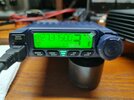
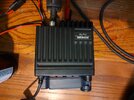
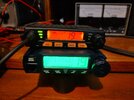
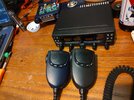
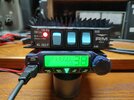
The Luiton LT-310SDR radio that I received came in an unmarked box, and the radio itself has no name or model number. This is not a big deal because the radio itself is what we are after. It came with all the normal mounting hardware and power cord, along with an owner’s manual printed on copy paper. My first impression is about how small this radio really is, and that it should be a good fit for modern cars. The microphone has buttons for channel up and down, ASQ, and noise reduction. The display has the channel display along with a frequency display with seven digits. It also has a bar graph for TX and RX signal as well as a few function indicators.

IMG_20260513_154502678_HDR.jpgIMG_20260601_182027453_HDR.jpg
 
Last edited:
  • Like
Reactions: Lawrence lin

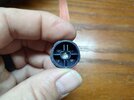
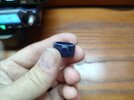
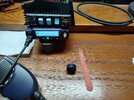
I encountered a problem on my unit when I took it out of the box. The main radio knob was stuck in like it was pushed on too far and wedged against the face of the radio. I was able to pull the knob out, but the first time I pushed it, it got stuck again. Also with the knob pulled out, it still rubbed the face and made turning the knob feel weird. I contacted Lawerence Lin and he assured me that they will increase the quality inspection standards to prevent this from happening.

My quick solution was to put some cellophane tape in the bottom of the knob hole so it would not go on too far.

Then I used an emery board to file the corners off the knob so it would clear the face.

.IMG_20260525_123254939_HDR.jpgIMG_20260525_123245322_HDR.jpgIMG_20260525_123209722_HDR.jpg
 
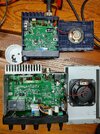
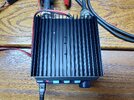
The inside of the radio reminds me of the Chierda S890, and the microphone appears to be almost the same. It is interesting to think about who made the radios, or at least who made the parts.

The "Mini" printed on the board made me remember this radio, the TYT SSB Mini:


IMG_20260514_161945918_HDR.jpgIMG_20260514_162135423_HDR.jpg
 
Last edited:
  • Like
Reactions: Lawrence lin
The performance of the radio overall is good, although the adjustments inside did not seem to do a whole lot. Maybe there is an engineering menu? The AM modulation will do 100% on power level 1 with a 1.5w carrier swinging to 6w with a whistle. Power level 2 gives 3w swinging to 10w while level 3 has 6w swinging to 14w. This was measured on my Autek WM1 which has a true peak reading. FM mode has 1,3,and 5w while sideband has 3,6 and 14w respectively.

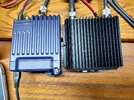
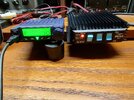
This radio pairs nicely with the KL203 which is slightly bigger than it. On SSB, power level 1 has 3w peak out of the radio, barely keying the amp to 50w peak. Level 2 with 6w and 75w peak, and level 3 with 14w and 100w peak out of the amp.IMG_20260525_121103184_HDR.jpgIMG_20260525_121138439_HDR.jpgIMG_20260525_121303357_HDR.jpgIMG_20260525_121310555_HDR.jpg
 
Last edited:
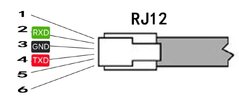
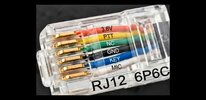
Big thanks to Simon the Wizard, he has some information on his site about this radio. Here is the microphone pin out, programming cable pin out along with programming software:


img_0740.jpgimg_0208-1.jpg
 
Thanks for the review. Your results are similar to mine. A couple of things I want to mention…

I did manage to make a Cobra 4 pin microphone adapter cable for my 310SDR, following the mic wiring from Panic Attack’s diagram found on his FB page. I can now use my Astatic 575 with the radio and the TX audio is much better. Yes, I lose the mic function buttons, but I can access the front panel of the radio easily. IMO this is the biggest improvement you can make to the radio. Perhaps someone will offer an adapter cable commercially?

When I broke the mic element off the board while trying to remove the mic board (see previous post in the other thread), I contacted BestCB to ask if replacement mics were available. At that time, they were not. Now, BestCB is offering replacement mics for $40. I did replace the element in my stock mic, which cost $1, but good to know you can replace your stock mic. +1 to BestCB.

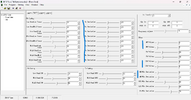
Simon has posted information about the tuning software for the Midland 8001 Pro being compatible with the 310SDR (and a few other radios). This software has adjustments for modulation, deviation, TX power levels, etc. I have a USB UART cable coming in order to make a cable to plug into the 310SDR and attempt to access some parameters via software. I don’t think there will be much improvement with the software, but I have to screw around with it just to satisfy my own curiosity.
 
  • Like
Reactions: Shadetree Mechanic
Thanks for the review. Your results are similar to mine. A couple of things I want to mention…

I did manage to make a Cobra 4 pin microphone adapter cable for my 310SDR, following the mic wiring from Panic Attack’s diagram found on his FB page. I can now use my Astatic 575 with the radio and the TX audio is much better. Yes, I lose the mic function buttons, but I can access the front panel of the radio easily. IMO this is the biggest improvement you can make to the radio. Perhaps someone will offer an adapter cable commercially?

When I broke the mic element off the board while trying to remove the mic board (see previous post in the other thread), I contacted BestCB to ask if replacement mics were available. At that time, they were not. Now, BestCB is offering replacement mics for $40. I did replace the element in my stock mic, which cost $1, but good to know you can replace your stock mic. +1 to BestCB.

Simon has posted information about the tuning software for the Midland 8001 Pro being compatible with the 310SDR (and a few other radios). This software has adjustments for modulation, deviation, TX power levels, etc. I have a USB UART cable coming in order to make a cable to plug into the 310SDR and attempt to access some parameters via software. I don’t think there will be much improvement with the software, but I have to screw around with it just to satisfy my own curiosity.
My only concern with the microphone is that there is no menu option to select electret or dynamic. So there will be a small voltage going through the dynamic element. It won't hurt it, but when I make an adapter, it will have a capacitor to block the dc current. Let us know how the programming goes, I would eventually like to try it. Do you have a link for the cable? I want to make sure I get the right thing.
 
Last edited:
Interesting
Big thanks to Simon the Wizard, he has some information on his site about this radio. Here is the microphone pin out, programming cable pin out along with programming software:


View attachment 76817View attachment 76818
Interesting that the programming software is compatible with several different radios.

73
Jeff
 
  • Like
Reactions: Shadetree Mechanic
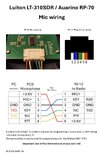
Credit to Panic Attack on his public FB page…
IMG_1371.jpeg

***verify the pin numbers on the RJ-12 connector.***
Panic Attack lists them as pins 2,4 and 6, however the screenshots in Shadetree’s posts above indicate those pins as 1,3 and 5.

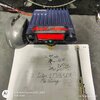
Also indicated by this photo (pin 1-audio, pin 3-shield, pin 5-PTT)
IMG_1395.jpeg

I followed the drawing from Panic Attack and oriented the plug with the locking tab facing up when I wired it. I am sure the voltage is on the far right pin when looking at the mic jack on the front of the radio and the above photo confirms that.

I used an old RJ-12 cable to see if it would work and it did. I only used the three indicated wires. On the 4 pin male mic connector(obtained from Amazon), I used pin 1-shield, pin 2-audio, pin 3-PTT, pin 4-n/c.
 
  • Like
Reactions: Shadetree Mechanic
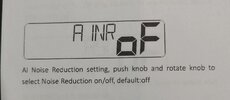
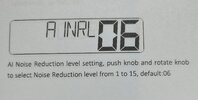
This radio has two different noise reduction features. One is DSP like the Anytone radios have, and the other one is AI Noise Reduction. The AI version is not like any I have seen before. The DSP in the Anytones is a game changer and this AI Noise Reduction takes it to a new level. Now Anytone has some catching up to do...

IMG_20260602_154517997 (1).jpgIMG_20260602_154526160_HDR (1).jpg

The RX volume is a little loud, so I turned down the RF gain a little. Then with the squelch off, I put the AI Noise Reduction at 8. It is so quiet, it reminds me of FM mode, but with AM and SSB. I can even use the preamp in the 203 and it actually is helpful to get the stations in the weeds. If you can tell someone is there, but can't make out any words, the preamp brings them right in without the noise we are used to.

Basically the AI Noise Reduction is like a noise gate that only passes words. I was truly surprised when I discovered how well it works. It works for RX as well as TX and can be turned on and off with a button on the mic.

Here is a short video that shows how the TX AI Noise Reduction works:

View attachment VID_20260514_154833908.mp4
 
Last edited:

dxChat
Help Users
  • No one is chatting at the moment.
  • @ COWBOYS:
    Denton GL 1000 ham amp comes on, but will not key up
  • @ COWBOYS:
    What can I do to make my Denton GLS 1000 amp to load ?
  • @ AudioShockwav:
    Try starting a new thread in the Amplifier section and asking the question, more people will see it to respond.
  • @ iw7ed:
    hello