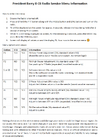
So, after some buggering, I did find out how to get into the alignment menu, and figured out a couple of the options.
Hold PTT + MODE + EMG, then power on the radio.
Press the EMG then MODE buttons when you see the TS displayed.
AL = AM Limiter (modulation) - Lower is more max modulation
PL = Power Level (both FM and AM carrier)
R1 = Probably something to do with RX tuning, didn't mess with it.
F2 = Probably frequency adjustment, didn't mess with it.
Just be sure to write down your stock settings so you can return to factory tuning if you wish.
I did notice that this radio does have holes for a 3 pin jumper header, and two more locations for jumper wires. Didn't mess with those, but I'm guessing those are for the channel expansion.


 So far, haven't been able to find it.