• You can now help support WorldwideDX when you shop on Amazon at no additional cost to you! Simply follow this Shop on Amazon link first and a portion of any purchase is sent to WorldwideDX to help with site costs.

The Almost President Thomas FCC Service Manual


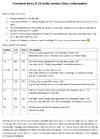
So, after some buggering, I did find out how to get into the alignment menu, and figured out a couple of the options.

Hold PTT + MODE + EMG, then power on the radio.
Press the EMG then MODE buttons when you see the TS displayed.

AL = AM Limiter (modulation) - Lower is more max modulation
PL = Power Level (both FM and AM carrier)
R1 = Probably something to do with RX tuning, didn't mess with it.
F2 = Probably frequency adjustment, didn't mess with it.

Just be sure to write down your stock settings so you can return to factory tuning if you wish.

I did notice that this radio does have holes for a 3 pin jumper header, and two more locations for jumper wires. Didn't mess with those, but I'm guessing those are for the channel expansion.

 
Last edited:
Captured this from the video:
 

Attachments

  • President Thomas-Barry II Service Menu Options.png
    President Thomas-Barry II Service Menu Options.png
    376.3 KB · Views: 88

dxChat
Help Users
  • No one is chatting at the moment.
  • @ heartbreaker3473:
    Hello gentlemen and Ladies. I have the dreaded RCI-2990 receive issue where my radio gets distorted when people get close to my location. I found the C90 Capacitor, but I can not for the life of me find the C89 capacitor. Can or does anyone have a picture of the exact location of C89 ? Thank you in advance, Wes
  • @ AudioShockwav:
    Wes, it's better if you start a thread on the main forum, more people are going to see your question.
  • @ heartbreaker3473:
    Okay, sorry, will put in a forum
  • @ heartbreaker3473:
    I put it in the general disscution help area and started a new thread. Thank you for letting me know.