Is your Audio shield (pin 5) the same as your circuit ground? For the buttons to work they have to connect (ground) to pin 5.I followed that wiring to the letter with the same caps and resistors and no up/down or PF operates with added buttons

You are using an out of date browser. It may not display this or other websites correctly.
You should upgrade or use an alternative browser.
You should upgrade or use an alternative browser.
-
You can now help support WorldwideDX when you shop on Amazon at no additional cost to you! Simply follow this Shop on Amazon link first and a portion of any purchase is sent to WorldwideDX to help with site costs.
-
The Winners of the three Retevis radios 16 Anniversary giveaway are announced!! Click Here to find out if you won!
Anytone At-6666 Pro
- Thread starter Eldorado828
- Start date


Ok I got it working. It was a ground wire that came disconnected.Is your Audio shield (pin 5) the same as your circuit ground? For the buttons to work they have to connect (ground) to pin 5.
Thanks for posting new wiring for the Pro series!


Figured it out, jumper is for 15 meter...not needed here. I hope this turns out to be a decent radio, cheers!I just received my 6666-pro straight from china, just trying to get 11 meters going on this with no luck. I see there are 3 2 pin jumpers and one 3 pin jumper, I suspect its one of these. Anyone convert there own?
Conversation started.I just received my 6666-pro straight from china, just trying to get 11 meters going on this with no luck. I see there are 3 2 pin jumpers and one 3 pin jumper, I suspect its one of these. Anyone convert there own?

Conversation started.
It has already been said several times, moving the jumper is only useful to add the 15 meters (21MhZ). For the 11 meters you need to press a sequence of keys. It is perfectly explained on YoutubeI just received my 6666-pro straight from china, just trying to get 11 meters going on this with no luck. I see there are 3 2 pin jumpers and one 3 pin jumper, I suspect its one of these. Anyone convert there own?
Yeah I figured that out thanks for the input...I will say Anytone really seems to be knocking it out of the park with there radios.It has already been said several times, moving the jumper is only useful to add the 15 meters (21MhZ). For the 11 meters you need to press a sequence of keys. It is perfectly explained on Youtube
I couldn't find a video for the new Pro version, are you sure that's the same power up sequence for the 11 meter mod?It has already been said several times, moving the jumper is only useful to add the 15 meters (21MhZ). For the 11 meters you need to press a sequence of keys. It is perfectly explained on Youtube
The videos I've seen are for the older version.
I would like to know how to do it myself.
Post or Send me video link if you could.

At about 1:05 he tells you how.I couldn't find a video for the new Pro version, are you sure that's the same power up sequence for the 11 meter mod?
The videos I've seen are for the older version.
I would like to know how to do it myself.
Post or Send me video link if you could.
Here's the desk mic with electret element for the Anytone 6666 I wired up with up/down buttons and a PF button.
Works really well!
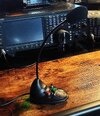
Works really well!
Better to give some more indications: for the 3 functions on the other microphone you need 3 resistors: 8.2K, 15K, 33KHere's the desk mic with electret element for the Anytone 6666 I wired up with up/down buttons and a PF button.
Works really well!
;-)
Yes, all the buttons are wired as per DR DX post back on page 14, #208Better to give some more indications: for the 3 functions on the other microphone you need 3 resistors: 8.2K, 15K, 33K
;-)
All functions work