• You can now help support WorldwideDX when you shop on Amazon at no additional cost to you! Simply follow this Shop on Amazon link first and a portion of any purchase is sent to WorldwideDX to help with site costs.

Galaxy DX2517 Troubleshooting Help

i think your problem lies in the circuit containing Q30, Q31, and Q33.

i know you said you already checked them but any experienced tech will tell you that it's always the thing you're already sure its not.

It takes some doing to get the right info for a situation like this because its a ranger radio and none of their service manuals have voltage charts for the semiconductors.

the good news is that these chassis are all very similar to each other, and luckily with this particular circuit they only changed the part numbers.

so if you go look at a service manual for an old galaxy 99v, you'll find the voltage chart, and then you just have to compare the schematics to cross-reference the part numbers.

im going to bet that you won't read the voltages i post here because your radio is stuck in "both" TX and RX, but it could still help.

so measure the voltages on one of the transistors, and if/when you find that it isn't right, pull that transistor out and test it. you might want to post your testing method here to be sure you're doing it right.

here's what the voltages should be:

Q30 is a 2SA1282 PNP transistor that is an E C B if you look at it facing you.
in RX: E=8.55v C=8.52v B=7.8v
in TX the only voltage that changes is C which should be 0 volts in TX.

Q31 is a 2SC945 NPN transistor and is also an E C B.
in RX: E=0v C=.10v B=.70v
in TX: E=0v C=8v B=0v

(the B might be the opposite on RX and TX as there may be a typo in the info im looking at)

Q33 is a 2SA1282 PNP transistor and is E C B.
(BTW these can a be a bit hard to find these days)

in RX: E=8.55v C=0v B=8.03v
in TX: E=8.55v C=8.37v B=7.75v

i think you're going to find one of these parts shorted and i think its going to be Q33 but that's just a guess.

LC
Got a chance to work on it tonight.
Q30 and Q33 have been changed with transistors from another galaxy that had no switching issues. D71,72,73,59 have been replaced with 3 series 4148 diodes. d70 replaced, Q37 Q55 Q54 have been replaced with parts from rfparts or ica manufacturing or trucks cb sales. Q30,Q33 voltages are identical from left to right the voltages are 9.47, 9.42, 8.73V. Q37 voltages from left to right leg is 12.90,9.80, 13.60. Q35 voltages from left to right are 2v, 12.91v, 12.38v. I analyzed the schematic around those voltages for a bit but have to call it a night. There are some electrolytic capacitors around the q35 q37 ic7 area that I may work on pulling to check and replace tomorrow since I haven't found a problem yet. will hopefully get back on it again tomorrow. Hopefully some of these voltages will give some clues. Also, Q31 and Q35 have been replaced with 2sc1815 transistors out of an assortment from amazon. From what I looked up it said it was a direct replacement for the 2sc945. Hopefully using those aren't a problem. Another voltage I read was 2 volts on the positive lead of D72.
 
Your voltages on Q35 are a little confusing. Left to right is ECB, so 2v at emitter, 12.91v at the collector, and 12.38v at the base. The first two make sense, but that base voltage doesn't look right. Since we are getting a reasonable voltage from Q37, I will consider it a typo.

The issue of both RX and TX would be independent of that regulator though, so we need to figure out why Q33 is turning on in RX.

Looking back at post #6, I see you reported fluctuating voltages on the op-amp pins. Pin 6 fluctuating slightly and pins 5 and 7 fluctuating heavily points me directly to pin 6. A slight fluctuation there will cause a large fluctuation in the output and also pin 5 due to the hysteresis feedback resistor.

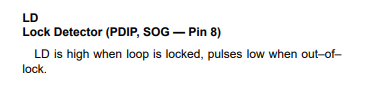
Here's my guess. Something at the PLL is causing the lock detect to oscillate or send pulses. This causes the RX/TX switch to oscillate. I'd bet that RX and TX are not on at the same time, rather oscillating back and forth giving the impression that they are both on. The rail capacitors probably hide the oscillations from Q30 and Q33.

To test this theory, lift one leg of D60 and see if the TX light shuts off. Don't operate it like this though, it's just a test. I am going to bet that C103 went dry or something at the PLL is causing this.
 
Your voltages on Q35 are a little confusing. Left to right is ECB, so 2v at emitter, 12.91v at the collector, and 12.38v at the base. The first two make sense, but that base voltage doesn't look right. Since we are getting a reasonable voltage from Q37, I will consider it a typo.

The issue of both RX and TX would be independent of that regulator though, so we need to figure out why Q33 is turning on in RX.

Looking back at post #6, I see you reported fluctuating voltages on the op-amp pins. Pin 6 fluctuating slightly and pins 5 and 7 fluctuating heavily points me directly to pin 6. A slight fluctuation there will cause a large fluctuation in the output and also pin 5 due to the hysteresis feedback resistor.

Here's my guess. Something at the PLL is causing the lock detect to oscillate or send pulses. This causes the RX/TX switch to oscillate. I'd bet that RX and TX are not on at the same time, rather oscillating back and forth giving the impression that they are both on. The rail capacitors probably hide the oscillations from Q30 and Q33.

To test this theory, lift one leg of D60 and see if the TX light shuts off. Don't operate it like this though, it's just a test. I am going to bet that C103 went dry and is not smoothing the PD pulses.
Okay, I will try this this evening when I work on it and get back with what I find out after lifting d60. Last night I did have Q30 out and tried turning it on and the green light went out and was only red. That may be normal since it was out but just thought I'd mention it. Thanks for the help so far.
 
Okay, I will try this this evening when I work on it and get back with what I find out after lifting d60. Last night I did have Q30 out and tried turning it on and the green light went out and was only red. That may be normal since it was out but just thought I'd mention it. Thanks for the help so far.
Also the guy I'm helping who owns the radio had it on for 17 years straight without ever turning it off because he leaves it on downstairs so he can use it upstairs and is too old to go downstairs to turn it off and on. Don't ask me why he does that lol that is just what he told me. Im surprised it even stayed on that long without problems.
 
  • Like
Reactions: brandon7861
To further support my theory of a pulsing lock detect, from the PLL datasheet...
1775170562519.png
There must be a McGyver way to evesdrop on that without a 'scope. But a 'scope is the only way I know to ID that fault. This radio demostrates the value of the 30-buck fleabay transistor tester. If your time is worth anything at all, it's a good bang for the buck.

73
 
There must be a McGyver way to evesdrop on that without a 'scope.
Computer sound card using the line-in jack and a program like friture could probably do it. It's probably got a blocking capacitor so it won't see DC stuff, but anything between 20Hz and 20kHz should be possible. Just be sure it isn't sourcing phantom/electret mic power first. Most sound cards I've seen allow line-in to do other things like that and some even auto detect, so make sure there isn't DC coming out first.

I'd bet those pulses are 10kHz just like the PD freq. And a receiver could hear the rest of the signals. Definitely not as fun as using a real scope, but maybe if one were desperate enough...
 
There must be a McGyver way to evesdrop on that without a 'scope. But a 'scope is the only way I know to ID that fault. This radio demostrates the value of the 30-buck fleabay transistor tester. If your time is worth anything at all, it's a good bang for the buck.

73
There must be a McGyver way to evesdrop on that without a 'scope. But a 'scope is the only way I know to ID that fault. This radio demostrates the value of the 30-buck fleabay transistor tester. If your time is worth anything at all, it's a good bang for the buck.

73
I do have a scope and a real cheap transistor checker if that would help me. How can I use them to find the problem like you are mentioning?
 

dxChat
Help Users
  • No one is chatting at the moment.