ok so the beta is the MODIFIED version and USE AT YOUR OWN RISK. and the LATEST/FINAL FIRMWARE is the original version in case the BETA version doesnt work on your radio.. YES?No, extended VHF is only available on the short case version.
Yes, the "official release" firmware is good to go, but it is the older factory firmware that does NOT include the latest features. It was added here in case anyone wished to roll back, for any reason.
If you want the latest and full feature set available, use the latest and final firmware version linked below. (It has proven to be safe with no issues reported so far, despite the general warnings I had to add to the post):
Hi all,
As you may know, the original LONG case Anytone AT-5555Nii radio is now discontinued and has been replaced by the new SHORT case AT-5555Nii radio.
Although the LONG case radio is discontinued, an updated AT-5555Nii LONG CASE firmware was worked on in 2024 that adds many new features, however it was not (and will not be) officially released as there is a potential that some early versions of the long case radio may be incompatible due to component changes that were made along the way.
However, with some clear points and caveats, I can share this BETA firmware.
Please...

You are using an out of date browser. It may not display this or other websites correctly.
You should upgrade or use an alternative browser.
You should upgrade or use an alternative browser.
-
You can now help support WorldwideDX when you shop on Amazon at no additional cost to you! Simply follow this Shop on Amazon link first and a portion of any purchase is sent to WorldwideDX to help with site costs.
-
Retevis is giving away THREE radios for their 16th Anniversary! Click Here to enter!
Anytone at-5555n II (version 2)
- Thread starter Eldorado828
- Start date


No need to yell. That is correct....the beta is the updated software to run on the "long case" 5555N2 which gives it most of the abilities of the short case version. The other software posted later in the thread is to roll back to the original firmware if you have problems.ok so the beta is the MODIFIED version and USE AT YOUR OWN RISK. and the LATEST/FINAL FIRMWARE is the original version in case the BETA version doesnt work on your radio.. YES?
The upgrading process is very very easy. Follow Pez' instructions exactly and you won't have any problems. Note that some very early 5555N2's may have issues with the upgrade...the info on which those are is in the thread too. Good Luck!

Good evening all,
Just a couple of small questions regarding my AT-5555 N II. How do I determine if I (own) have a "short" or "long"- case model? Next, how do I preform a hard reset on the unit? The OPT menu function (reset according the manual) should do the trick, however I'am not 100% this gives me the wanted result(s), because I see no changes. And for the last one, how in the world do I access the "hidden" features/menu? There are so much answers and before going to try all of them I fear it does my state of mind no good to go experimenting with all these found "solutions" and Youtube- videos as found on the Internet. Please help.
TIA.
Just a couple of small questions regarding my AT-5555 N II. How do I determine if I (own) have a "short" or "long"- case model? Next, how do I preform a hard reset on the unit? The OPT menu function (reset according the manual) should do the trick, however I'am not 100% this gives me the wanted result(s), because I see no changes. And for the last one, how in the world do I access the "hidden" features/menu? There are so much answers and before going to try all of them I fear it does my state of mind no good to go experimenting with all these found "solutions" and Youtube- videos as found on the Internet. Please help.
TIA.

Hi Hans:Good evening all,
Just a couple of small questions regarding my AT-5555 N II. How do I determine if I (own) have a "short" or "long"- case model? Next, how do I preform a hard reset on the unit? The OPT menu function (reset according the manual) should do the trick, however I'am not 100% this gives me the wanted result(s), because I see no changes. And for the last one, how in the world do I access the "hidden" features/menu? There are so much answers and before going to try all of them I fear it does my state of mind no good to go experimenting with all these found "solutions" and Youtube- videos as found on the Internet. Please help.
TIA.
See the picture below for the size difference.
What are the "wanted" reset results you want to see?
For reset, there is two options, OPT and ALL (rotate the CH knob). ALL is what you want, it will reset the menu and factory channel settings.
Regarding the "hidden" menu - I strongly advise you do NOT play with this. A Reset does NOT restore any changes you make in there - they are locked in and there to stay. If you do not have all the required test equipment and knowledge, I suggest you stay out of the hidden service / debug menu.
73
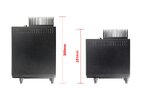
@Pez; Thank you kindly, it seems I have the short version thus that would mean that I have the/a latest or newest model. Good! Thank you for the reset "ALL" option, couldn't find it first, so here also a big thank you for mentioning.
Ah, I see about the "hidden" feat menu (no go to factory defaul etc.) can I conclude that all the settings in this special menu are correct? I've read somewhere that the mic. setting can or must be adjusted for better response (?) on the receiving end. Well hope to hear. Also read that one MUST write down the all the current values in this hidden menu before changing anything, hence the fact that you've also mentioned this that there's no restoring to factory defaults, a one way street so to speak... bummer.
No firmware upgrade too? Anytone did a good job then creating and programming this type of radio before it left the production plant!
Thanks for your time, attention and do have a nice weekend.
Ah, I see about the "hidden" feat menu (no go to factory defaul etc.) can I conclude that all the settings in this special menu are correct? I've read somewhere that the mic. setting can or must be adjusted for better response (?) on the receiving end. Well hope to hear. Also read that one MUST write down the all the current values in this hidden menu before changing anything, hence the fact that you've also mentioned this that there's no restoring to factory defaults, a one way street so to speak... bummer.
No firmware upgrade too? Anytone did a good job then creating and programming this type of radio before it left the production plant!
Thanks for your time, attention and do have a nice weekend.
Hi Hans, you're welcome.@Pez; Thank you kindly, it seems I have the short version thus that would mean that I have the/a latest or newest model. Good! Thank you for the reset "ALL" option, couldn't find it first, so here also a big thank you for mentioning.
Ah, I see about the "hidden" feat menu (no go to factory defaul etc.) can I conclude that all the settings in this special menu are correct? I've read somewhere that the mic. setting can or must be adjusted for better response (?) on the receiving end. Well hope to hear. Also read that one MUST write down the all the current values in this hidden menu before changing anything, hence the fact that you've also mentioned this that there's no restoring to factory defaults, a one way street so to speak... bummer.
No firmware upgrade too? Anytone did a good job then creating and programming this type of radio before it left the production plant!
Thanks for your time, attention and do have a nice weekend.
The only thing you might want to do, is adjust in the normal menu (not the hidden service menu), the the "MIC" gain, "TONE" for SSB, and "FMDEV" for FM, and you will be good to go.
FYI- some of the settings in the hidden menu can be accidentally cleared, and then you can not enter these back in (even if you write them down), without using test equipment. This is why we always caution folks about this menu!
The firmware had a couple of revisions shortly after it was first released, but now it's pretty solid and has not had any new updates for some time. It's a solid performer out of the box, with no adjustments needed for a good time.
Have a good weekend. Good DX!
Pez
Forgot to mention my setup.
- Anytone AT-55555N II radio (short model)
- Sirio 827 ground-plane antenna wit nylon anti-resonating ring (against the noisy winds, living at the coastal line of the North Sea)
- RG-213 coax, Bedea (Berkenhoff & Drebes, Germany), 15 meters
- Messi & Paoloni PL-269 compression connectors (Italy)
- Heatkit HM-2102 pwr/swr- meter (Benton Harbor, U.S.A., bought off eBay), partially rebuild and calibrated and a digital one, SureCom, SW102-HF (Aliexpress) witch has a changed Li-Ion batterypack also replaced by me with a 1000mAh type, was standard 550mAh (Aliexpress). SureCom advertised the unit with a 880mAh batterypack, no such thing though.
- Common Mode chokes, 3 pieces total (ideal should be 5 pieces) mounted at the feedpoint of the antenna, brand Fairite, mix31, clamp-on type (U.S.A.)
- Common Mode filter on the other side of the cable/coax, diy- kit from HF Kits Netherlands with a FT240-31 toroid
- Standard 30A/13,8VDC switched mode power supply (K-PO) modified by me and has now a removed cigarette ligtherplug (female) was on the frontside witch created a massive groud-loop in the unit itself (!), added a dc- filter on the 4mm bananaplug studs inside for extra dc- filtering and changed some component values also witch leaves me now with a 35Amps/13,8VDC small, efficient power supply with almost any noticable RFI by-products. Checked this with a tiny Spectrum Analyser (Aliexpress) and remarkable no excessive heat.
- For backup a President Teddy II little 4 watts AM/FM tranceiver, modified (Jumper re-placed and one cut wire), by the way, a nice little unit and proudly made in the U.S.A..
QTH, Netherlands (Europe)
This should do for now I hope.
Regards.
- Anytone AT-55555N II radio (short model)
- Sirio 827 ground-plane antenna wit nylon anti-resonating ring (against the noisy winds, living at the coastal line of the North Sea)
- RG-213 coax, Bedea (Berkenhoff & Drebes, Germany), 15 meters
- Messi & Paoloni PL-269 compression connectors (Italy)
- Heatkit HM-2102 pwr/swr- meter (Benton Harbor, U.S.A., bought off eBay), partially rebuild and calibrated and a digital one, SureCom, SW102-HF (Aliexpress) witch has a changed Li-Ion batterypack also replaced by me with a 1000mAh type, was standard 550mAh (Aliexpress). SureCom advertised the unit with a 880mAh batterypack, no such thing though.
- Common Mode chokes, 3 pieces total (ideal should be 5 pieces) mounted at the feedpoint of the antenna, brand Fairite, mix31, clamp-on type (U.S.A.)
- Common Mode filter on the other side of the cable/coax, diy- kit from HF Kits Netherlands with a FT240-31 toroid
- Standard 30A/13,8VDC switched mode power supply (K-PO) modified by me and has now a removed cigarette ligtherplug (female) was on the frontside witch created a massive groud-loop in the unit itself (!), added a dc- filter on the 4mm bananaplug studs inside for extra dc- filtering and changed some component values also witch leaves me now with a 35Amps/13,8VDC small, efficient power supply with almost any noticable RFI by-products. Checked this with a tiny Spectrum Analyser (Aliexpress) and remarkable no excessive heat.
- For backup a President Teddy II little 4 watts AM/FM tranceiver, modified (Jumper re-placed and one cut wire), by the way, a nice little unit and proudly made in the U.S.A..
QTH, Netherlands (Europe)
This should do for now I hope.
Regards.

My 5555N2 one day didn't power on. turning the knob to off, then back on it powered up. it has gotten so bad now that it will power on 1/100 times. is this a known problem? any procedures to track down the issue?
thanks
thanks
My 5555N2 one day didn't power on. turning the knob to off, then back on it powered up. it has gotten so bad now that it will power on 1/100 times. is this a known problem? any procedures to track down the issue?
thanks
Maybe a bad power switch??? I would just leave the unit on and maybe just turn of your power supply instead.My 5555N2 one day didn't power on. turning the knob to off, then back on it powered up. it has gotten so bad now that it will power on 1/100 times. is this a known problem? any procedures to track down the issue?
thanks

I've heard that issue with some of the early production radios and it was the the control pot with the on off switch. A guy I know drilled a small hole and flooded it with cleaner and voila it worked again. You could probably do some research and come up with a new pot if needed.My 5555N2 one day didn't power on. turning the knob to off, then back on it powered up. it has gotten so bad now that it will power on 1/100 times. is this a known problem? any procedures to track down the issue?
thanks
It's the switch itself. I have heard of this problem happening. As Eldorado says, flooding it with a plastic-safe contact cleaner may help.My 5555N2 one day didn't power on. turning the knob to off, then back on it powered up. it has gotten so bad now that it will power on 1/100 times. is this a known problem? any procedures to track down the issue?
The solution is to do what I do, and just leave the radio on 24/7...........electronics last much much longer if they stay powered on continuously. Turning things on and off constantly creates thermal cycling in components and that causes failure much sooner than constant temperature would. It also wears out the cheap Chinese switch sooner, as you have found out.
On my 5555N2 it was the encoder knob that became useless after only a couple years. I use a Turner desk mic on the radio, so there are no channel buttons on the mic. My solution was to mount two small pushbutton switches in the top of the radio's case for channel up and down. This way I can also use the VFO function that the radio has if it's the short case version or is an updated long case.
It's in my car. If i can find a way to bypass it, I'd be happy with and external power switch on the power wire.Maybe a bad power switch??? I would just leave the unit on and maybe just turn of your power supply instead.
Interesting solution. Thank youI've heard that issue with some of the early production radios and it was the the control pot with the on off switch. A guy I know drilled a small hole and flooded it with cleaner and voila it worked again. You could probably do some research and come up with a new pot if needed.
I hear ya. Capacitors don't like to sit discharged. Leaving it on 24/7 in the car isn't viable for me. After a day or so, my battery is flat. hehIt's the switch itself. I have heard of this problem happening. As Eldorado says, flooding it with a plastic-safe contact cleaner may help.
The solution is to do what I do, and just leave the radio on 24/7...........electronics last much much longer if they stay powered on continuously. Turning things on and off constantly creates thermal cycling in components and that causes failure much sooner than constant temperature would. It also wears out the cheap Chinese switch sooner, as you have found out.
You know I feared that when I got mine. I use the buttons on the mic to save wear and tear on the coding knob. That and the knob springs for the detents is too strong.On my 5555N2 it was the encoder knob that became useless after only a couple years. I use a Turner desk mic on the radio, so there are no channel buttons on the mic. My solution was to mount two small pushbutton switches in the top of the radio's case for channel up and down. This way I can also use the VFO function that the radio has if it's the short case version or is an updated long case.
Clever solution with the push buttons.
Thanks so much for the help everyone. I'll let y'all know how it goes.
I added the same buttons to my Kpo 532 handheld microphone for the same reason. The encoder is starting to show signs of failure. I have the updated long version chassis.It's the switch itself. I have heard of this problem happening. As Eldorado says, flooding it with a plastic-safe contact cleaner may help.
The solution is to do what I do, and just leave the radio on 24/7...........electronics last much much longer if they stay powered on continuously. Turning things on and off constantly creates thermal cycling in components and that causes failure much sooner than constant temperature would. It also wears out the cheap Chinese switch sooner, as you have found out.
On my 5555N2 it was the encoder knob that became useless after only a couple years. I use a Turner desk mic on the radio, so there are no channel buttons on the mic. My solution was to mount two small pushbutton switches in the top of the radio's case for channel up and down. This way I can also use the VFO function that the radio has if it's the short case version or is an updated long case.