• You can now help support WorldwideDX when you shop on Amazon at no additional cost to you! Simply follow this Shop on Amazon link first and a portion of any purchase is sent to WorldwideDX to help with site costs.
  • A Winner has been selected for the 2025 Radioddity Cyber Monday giveaway! Click Here to see who won!

Uniden Madison USB/LSB problem

you should not have to have your clarifier turned off center in order to receive and transmit at the same freq.

if you have to, this means that your clarifier is still locked and you haven't adjusted the TX trimmer resistor correctly.

when aligning this board, specifically the PLL/VCO section, always start with the USB adjustment, as it is actually trimming the crystal.
you can chase your tail a bit if you do it in another order.

so, set the radio to USB mode, with the clarifier set to exactly centered. (12o'clock)
radio on channel 19.

connect freq counter to TP1.
set CT1 for 34.98650 mhz

set radio to LSB, now set L22 for 34.98350 mhz

Set radio to AM, now set L23 for 34.98500 mhz.

go back and repeat the procedure to make sure they are all correct.


now you can set your IF (7.8mhz section).

AM mode is set in TX, and is set for 7.80000mhz.

now you can set USB and LSB for 7.8015 and 7.7985 respectively.

now connect a freq counter to the antenna jack through a sampler so you don't blow it up, and set the radio to AM mode.
key the mic, and adjust VR5 until the counter reads 27.18500 mhz.

now your clarifier should be able to stay centered when you key and unkey the mic and you'll be transmitting at the same freq you receive on.

last step is to "tweak" the USB and LSB IF trimmers for best transmitted voice tone on a receiver that is known to be on freq.

you could also unlock your clarifier which would make some of this alignment not necessary.
LC
 
  • Like
Reactions: David Springmire
you should not have to have your clarifier turned off center in order to receive and transmit at the same freq.

if you have to, this means that your clarifier is still locked and you haven't adjusted the TX trimmer resistor correctly.

when aligning this board, specifically the PLL/VCO section, always start with the USB adjustment, as it is actually trimming the crystal.
you can chase your tail a bit if you do it in another order.

so, set the radio to USB mode, with the clarifier set to exactly centered. (12o'clock)
radio on channel 19.

connect freq counter to TP1.
set CT1 for 34.98650 mhz

set radio to LSB, now set L22 for 34.98350 mhz

Set radio to AM, now set L23 for 34.98500 mhz.

go back and repeat the procedure to make sure they are all correct.


now you can set your IF (7.8mhz section).

AM mode is set in TX, and is set for 7.80000mhz.

now you can set USB and LSB for 7.8015 and 7.7985 respectively.

now connect a freq counter to the antenna jack through a sampler so you don't blow it up, and set the radio to AM mode.
key the mic, and adjust VR5 until the counter reads 27.18500 mhz.

now your clarifier should be able to stay centered when you key and unkey the mic and you'll be transmitting at the same freq you receive on.

last step is to "tweak" the USB and LSB IF trimmers for best transmitted voice tone on a receiver that is known to be on freq.

you could also unlock your clarifier which would make some of this alignment not necessary.
LC
Thank you very much for the great detail! I apologize for all the questions. I'll give it a try using that method. I bet you're right and been chasing my tail. That may be the whole issue. Interestingly the manuals I see all say to start in AM but as you mention USB is the only one trimming the crystal. I'd like to purchase a sampler because I'd like to make occupied bandwith measurements with a spectrum analyzer. Do you know where I could purchase one? I tried a splitter but impedance matchiing is a problem. Currently I'm usisng a x10 probe with the counter, measuring out of the TX mixer before the RF amplifiers to prevent damaging the test equipment like you mentioned. I pulled the amplifer B+ to elimnate RF from the amps too.
 
I'd like to purchase a sampler because I'd like to make occupied bandwith measurements with a spectrum analyzer. Do you know where I could purchase one?
Interesting topic thanks.

I did build one of these:

Other alternatives I used are:
Wrapping a small coil around a jumper cable
Pull the middle section of a three way female SO239 connector
Using attenuators (if you need an exact measurement)

There's many ways to pick up a bit of signal instead of the full monty.
--
Skyline
 
Last edited:
Interesting topic thanks.

I did build one of these:

Other alternatives I used are:
Wrapping a small coil around a jumper cable
Pull the middle section of a three way female SO239 connector
Using attenuators (if you need an exact measurement)

There's many ways to pick up a bit of signal instead of the full monty.
--
Skyline

 
  • Like
Reactions: 19wrc333
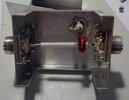
This is the RF Sampler I built. I had a couple of chassis mount SO239 and an aluminum project box and BNC connector already. I just had to buy the torrid. Works well.

Same thing with a different torid: https://www.n4ga.com/50db-hf-rf-sampler/

sampler-2.jpgsampler-3.jpg


Attachments

Last edited:
I like to use my coax switch as a sampler. If you pass the signal through the switch into a dummy load and look into the shorted port with your test equipment, the signals should be about 55-60dB down. Just don't flip the switch the wrong way lol, it gets expensive.
 
  • Like
Reactions: 19wrc333
the absolute cheapest RF sampler you can build?

well, it may not be fancy, but you can wrap a few turns of insulated wire around the wire going to the antenna jack of the radio and attach a scope probe to each end of the coil that you made.
LC
 
Interesting topic thanks.

I did build one of these:

Other alternatives I used are:
Wrapping a small coil around a jumper cable
Pull the middle section of a three way female SO239 connector
Using attenuators (if you need an exact measurement)

There's many ways to pick up a bit of signal instead of the full monty.
--
Skyline

Nice! Thank you!
 

dxChat
Help Users
  • No one is chatting at the moment.