I have an icon sm30 desk mic hooked up to an Icom IC 7300 and when I key the mic it makes a noise inside the radio. Kind of like a relay bouncing back and forth very quickly. Only while the switch is in motion. Is anybody familiar with this problem?

You are using an out of date browser. It may not display this or other websites correctly.
You should upgrade or use an alternative browser.
You should upgrade or use an alternative browser.
-
You can now help support WorldwideDX when you shop on Amazon at no additional cost to you! Simply follow this Shop on Amazon link first and a portion of any purchase is sent to WorldwideDX to help with site costs.
-
The Winners of the three Retevis radios 16 Anniversary giveaway are announced!! Click Here to find out if you won!
Problem with SM30 desk mic on Icom IC 7300.
- Thread starter ClaimJumper
- Start date

The problem has to be the mic switch. It seems like to me. All other microphones work fine. I was just curious if this was an issue for anyone else with the same microphone.

I'd check continuity with a multimeter between pins 5 and 6 of the mic plug while the mic is keyed to rule out the mic's switch.
Maybe an rf issue? don't know what mode you're on try turning the power and or mic gain down and see if either make any difference.
Maybe an rf issue? don't know what mode you're on try turning the power and or mic gain down and see if either make any difference.
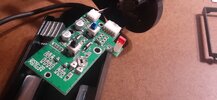
Wide open between pin 5 and pin 6. Power or mic game make no difference. The microphone works, and I'm using it. The action of the switch throw is what is causing the noise inside the radio. That noise stops when the microphone fully keyed. The point between receive and fully keyed is where the noise is. I use the lockdown key instead of the push to talk key. It's a different switch, and a shorter throw. I hope that makes sense. The blue switch is the lockdown. The black switch is the push to talk switch which seems to be the culprit. I believe it's just a bad scratchy switch.I'd check continuity with a multimeter between pins 5 and 6 of the mic plug while the mic is keyed to rule out the mic's switch.
Maybe an rf issue? don't know what mode you're on try turning the power and or mic gain down and see if either make any difference.
Attachments
I have the same mic and it does the same thing. I can see my external watt meter jumping as it chatters, but no one on the air hears anything.

I'd check continuity with a multimeter between pins 5 and 6 of the mic plug while the mic is keyed to rule out the mic's switch.
Maybe an rf issue? don't know what mode you're on try turning the power and or mic gain down and see if either make any difference.
Thank you! Now I can assume it's not my radio. That's exactly the same issue I have. Nobody else can hear it on the other end of the conversation. But it Chatters back and forth like a relay or something. I sent a query about it to Icom yesterday. We'll see what happens when they get back to me. Unfortunately I can't return mine I've had it so long. I never hooked it up until it was too late to return. I'm hoping they will cut me some slack.I have the same mic and it does the same thing. I can see my external watt meter jumping as it chatters, but no one on the air hears anything.
What radio are you using? Just curious.I have the same mic and it does the same thing. I can see my external watt meter jumping as it chatters, but no one on the air hears anything.
Same as you, IC 7300, and I can't return my mic either. I get good reports on the audio, but the chatter is aggravating.
It's a damn shame. Like you say I get amazing audio reports. That's the only reason I keep using it now. But something's definitely not right. Well. I'll post here whatever I hear from Icom.

Sounds like you have the VOX turned on to me. I would check VOX & Anti Vox.It's a damn shame. Like you say I get amazing audio reports. That's the only reason I keep using it now. But something's definitely not right. Well. I'll post here whatever I hear from Icom.

I would look at the edges of the PTT signal at the mic cable to see if you have ringing/switching noise.
Maybe the combination of that mics Pi filter and that particular radio creates a resonance. 100uH is pretty big for what it's doing (EMI filter I assume).
Try tacking a damping resistor across that PI network inductor (L4).
Maybe the combination of that mics Pi filter and that particular radio creates a resonance. 100uH is pretty big for what it's doing (EMI filter I assume).
Try tacking a damping resistor across that PI network inductor (L4).
Not the vox. Checked all settings, multiple times. Not a problem in the radio. Multiple microphones work perfectly well on this radio.Sounds like you have the VOX turned on to me. I would check VOX & Anti Vox.
I would look at the edges of the PTT signal at the mic cable to see if you have ringing/switching noise.
Maybe the combination of that mics Pi filter and that particular radio creates a resonance. 100uH is pretty big for what it's doing (EMI filter I assume).
Try tacking a damping resistor across that PI network inductor (L4).
I will keep that info for now in case I need to come back and test it myself. For now I'm chatting with Icom. We'll see what they've got to say first.I would look at the edges of the PTT signal at the mic cable to see if you have ringing/switching noise.
Maybe the combination of that mics Pi filter and that particular radio creates a resonance. 100uH is pretty big for what it's doing (EMI filter I assume).
Try tacking a damping resistor across that PI network inductor (L4).
Makes sense now, I hadn't put it together that it is working, just that it was just acting up between the movement of being unkeyed and ptt fully down.Wide open between pin 5 and pin 6. Power or mic game make no difference. The microphone works, and I'm using it. The action of the switch throw is what is causing the noise inside the radio. That noise stops when the microphone fully keyed. The point between receive and fully keyed is where the noise is. I use the lockdown key instead of the push to talk key. It's a different switch, and a shorter throw. I hope that makes sense. The blue switch is the lockdown. The black switch is the push to talk switch which seems to be the culprit. I believe it's just a bad scratchy switch.
Like you said it seems like a problem with the ptt button if the lock doesn't act up, not sure if the throw would make a difference or not.
I'm curious what icom has to say.
It wouldn't hurt to try some de oxit or contact cleaner, I've used the crc stuff from Walmart to clean ptt switches.
dxChat